vCenter talks to each host through two agents, and most “host not responding” cases come down to one of them or to the network path between vCenter and the host.
- hostd is the ESX host agent: it manages and configures the host and its virtual machines. Its log is
/var/log/hostd.log. - vpxa is the vCenter agent: it communicates with vCenter when the host is managed by vCenter. Its log is
/var/log/vpxa.log. - FDM (Fault Domain Manager) is the vSphere HA agent; restarting the management agents restarts it too.
The vCLS documentation shows the dependency directly: stopping vpxa on a host moves its connection state to notResponding, and restarting vpxa returns it to connected. A reconnect (ReconnectHost) reinstalls the agents, reconfigures the host if it is out of sync, checks licences and CPU count, and rediscovers networks and datastores. Figure 9.1 shows the agents, the states and the first actions.
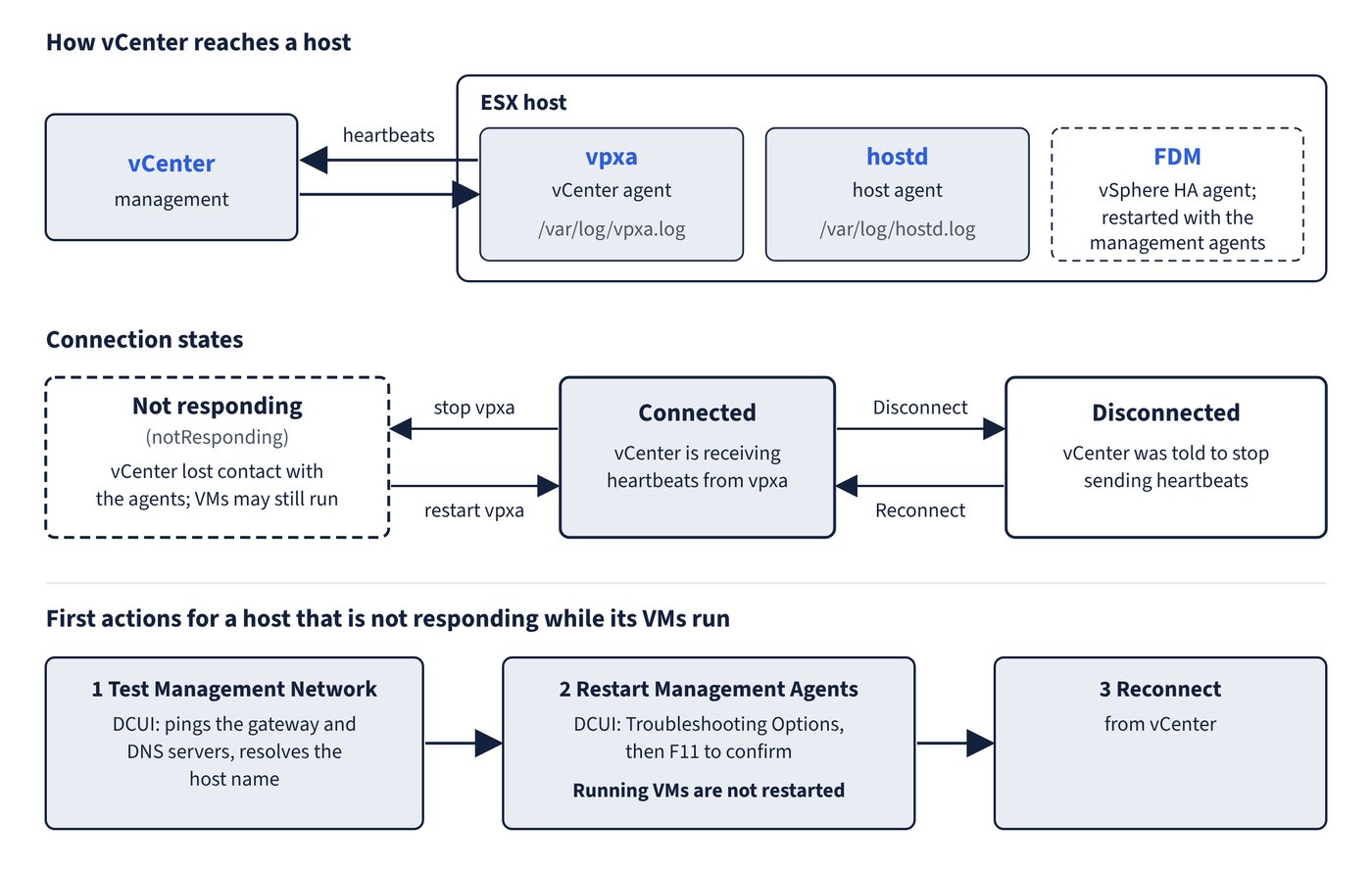
| State or symptom | What it means | First action |
|---|---|---|
| Connected | vCenter is receiving heartbeats from vpxa | None |
Not responding (notResponding) |
vCenter has lost contact with the host agents; the host and its VMs may still be running | Check the management network, then restart the management agents |
| Disconnected | An administrator (or the VMware Host Client “Disconnect from vCenter” action) told vCenter to stop sending heartbeats; disconnecting from the Host Client signals vCenter that the host is not responding | Reconnect the host from vCenter |
| Entering maintenance mode | Waiting for running VMs to be migrated or powered off | See Chapter 10, Virtual machines and vSphere clusters, for DRS evacuation problems |
Host Client shows 503 Service Unavailable on /ui after an upgrade |
A leftover /ui line in /etc/vmware/rhttpproxy/endpoints.conf overrides the Host Client |
Back up the file, remove /ui local 8308 redirect allow, run /etc/init.d/rhttpproxy restart |
Restarting the management agents
The documented method is the DCUI: Troubleshooting Options > Restart Management Agents, then F11 to confirm. This restarts all management agents and services in /etc/init.d (typically hostd, ntpd, sfcbd, slpd, wsman and vobd) and FDM if installed. Connected vSphere Client users lose connectivity while it runs; running VMs are not restarted. From the ESX Shell, VCF documents restarting the two agents individually:
/etc/init.d/hostd restart
/etc/init.d/vpxa restart
Decision rules:
- If a host shows as not responding but its VMs keep running, check the management network first (DCUI Test Management Network pings the gateway and DNS servers and resolves the host name), then restart the management agents, then reconnect.
- If only the management network is down, DCUI Restart Management Network is the targeted fix. It causes a brief outage, and a renewed DHCP lease with a new identity disconnects remote management.
- If a distributed switch problem has cut off management, DCUI Restore Standard Switch moves the management uplink to a new standard switch so the host stays reachable (it is dimmed when the host already uses a standard switch).
- If a distributed switch change fails with
Transaction has rolled back on the hostand the host disconnects, the operation exceeded the 30-second rollback timeout; raiseconfig.vpxd.network.rollbackTimeoutin 60-second steps and restart vCenter. - When adding a host behind a firewall, it must reach vCenter and the other hosts on port 902 (or the custom port), and its NFS mounts must be active.
Common trap: Treating “not responding” as a failed host and rebooting it - the state means vCenter lost contact with the agents; the VMs are usually still running, and restarting the management agents (which does not restart VMs) is the documented first step.