Diagnosing vSAN starts with two questions: what state the failed components are in, and whether each object still has enough of itself to stay accessible.
Absent and degraded components
| State | What vSAN concludes | Recovery | Typical causes |
|---|---|---|---|
| Degraded | Permanent failure; the component will not come back | Rebuild starts immediately if the cluster has the resources | Failed cache device, failed capacity device, failed storage controller |
| Absent | Temporary failure; the component might come back | Rebuild starts after the repair delay (60 minutes by default) if the component has not returned | Lost network connectivity, failed NIC, host failure or reboot, unplugged cache or capacity device |
The 60-minute wait is the Object Repair Timer (Configure > vSAN > Services > Advanced Options).
Object health and VM accessibility
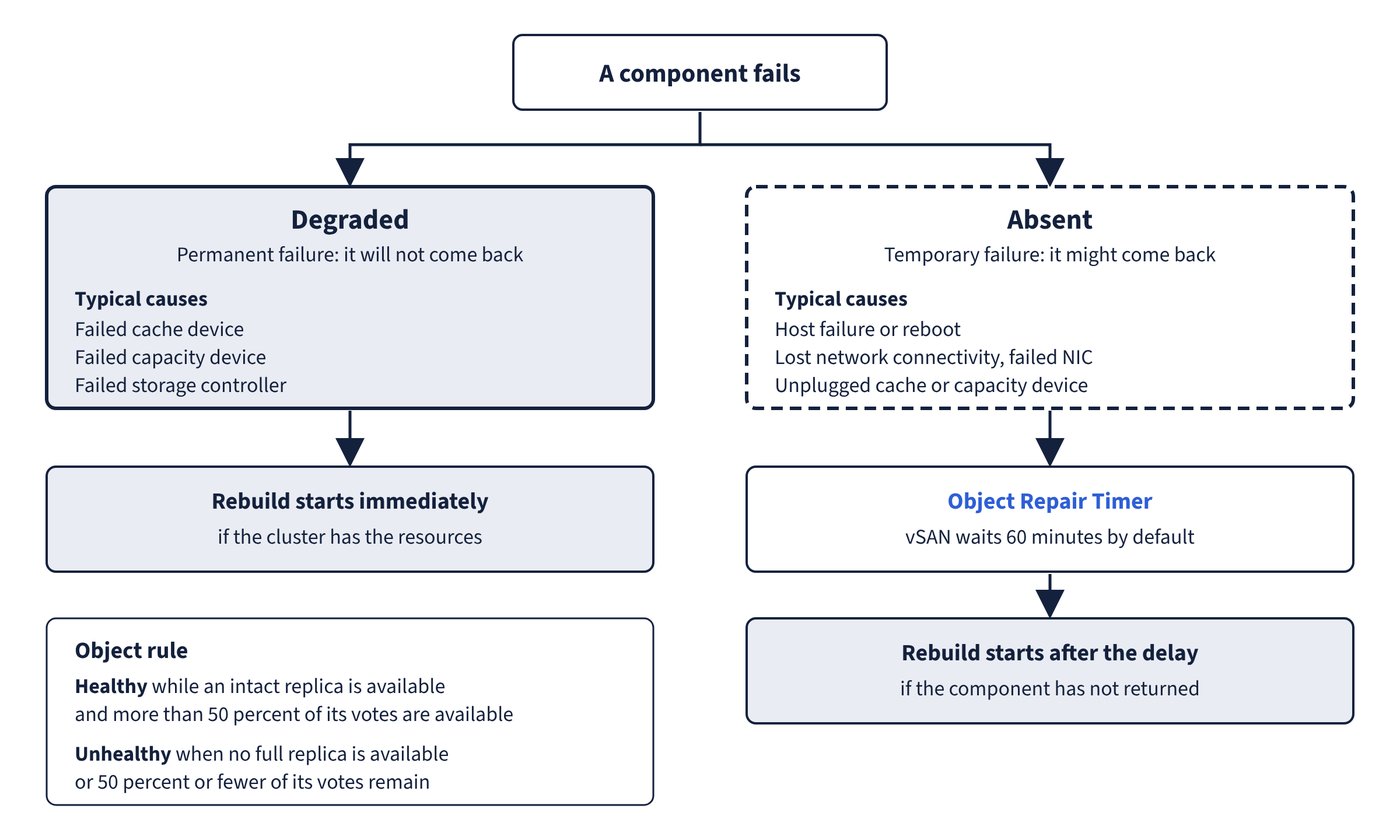
An object is healthy while an intact replica is available and more than 50 percent of its votes are available. It is unhealthy when no full replica is available or 50 percent or fewer of its votes remain. Compliance is a separate question: whether the object still meets its storage policy. A noncompliant but healthy object keeps working; an unhealthy object cannot be used. Figure 11.1 brings the component states and the object rule together.
| Inaccessible object | VM state | What the user sees |
|---|---|---|
| VM home namespace | Inaccessible; orphaned if vCenter or the host cannot read the .vmx file |
The VM process might crash and the VM might power off |
| VMDK | Inaccessible | The VM stays powered on but I/O to that disk fails; the guest may log a disk I/O timeout |
Inaccessibility is not permanent. When the underlying fault is fixed and a full replica plus more than half the votes are back, the VM becomes accessible again by itself.
Failure scenarios
When an object loses a component, its I/O pauses for 5 to 7 seconds while vSAN re-evaluates. With FTT 1 or more, objects stay available and vSAN reprotects when resources allow; with FTT 0, the object becomes inaccessible and the documented recovery is restore from backup.
| Failure | Component state | Specific behaviour and evidence |
|---|---|---|
| Device failing gradually (sustained latency or congestion) | Absent | Evacuated as a dying disk; Disk operation finding warns; Disk Management shows Unhealthy, then DyingDiskEmpty |
| Capacity or ESA pool device fails | Degraded | Rebuilt elsewhere if space allows |
| OSA cache device fails | Degraded (cache and all capacity devices in the group) | Treated as failure of the entire disk group |
| Storage controller fails | Degraded (all disk groups on the controller) | All devices in all disk groups failing at once on a single-controller host suggests the controller; check the VMkernel log |
| Host not responding | Absent | vSAN waits for the host, then rebuilds after the repair delay |
| Network partition | Absent (isolated hosts) | The partition holding over 50% of an object’s votes keeps it; return within 60 minutes means resync, otherwise rebuild |
| Host reboots in an encrypted cluster without reaching the KMS | Disk groups locked | Disks behave as unmounted and objects are inaccessible; an Encryption health finding warns. Restore KMS communication and re-establish trust |
After a multiple-host failure, vSphere HA restarts a vSAN VM only when it has quorum and the most recent copy of the object; if the last host to fail holds that copy, HA waits for it. A VM whose namespace and VMDK are in different partitions cannot be powered on in either.
Common trap: Expecting an unplugged or rebooting host’s data to be rebuilt straight away - those components are absent, not degraded, so vSAN waits for the 60-minute repair timer before rebuilding. Immediate rebuild applies only to degraded components.