There are two replacement paths: let VCF Operations obtain the certificate from the configured CA, or bring in a certificate signed outside VCF. The import path fails mostly on format and chain, the configured-CA path on the CA itself. Figure 6.1 sets the two paths side by side.
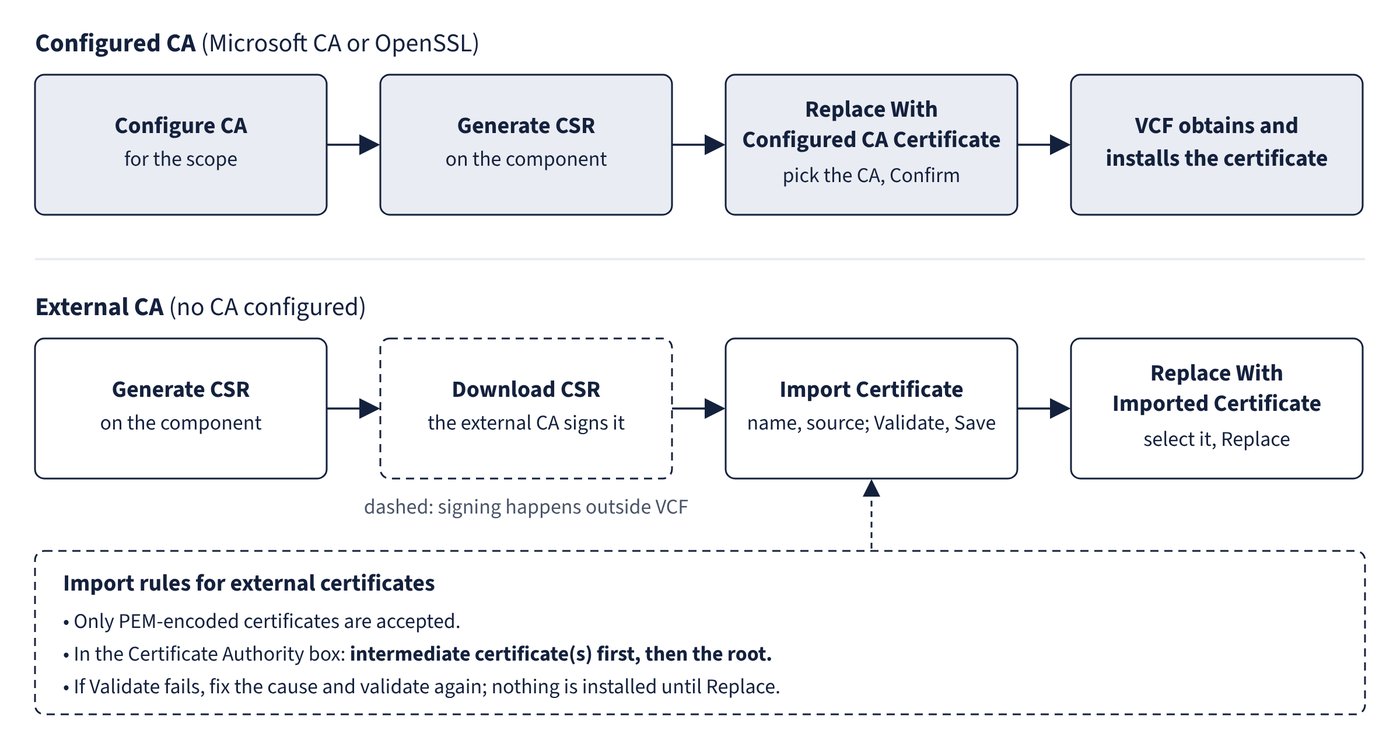
The two paths
| Step | Configured CA (Microsoft CA or OpenSSL) | External CA (no CA configured) |
|---|---|---|
| 1 | Configure CA for the scope | Not needed |
| 2 | Generate CSR on the component | Generate CSR on the component |
| 3 | Replace With Configured CA Certificate, pick the CA, Confirm | Download CSR, have the external CA sign it |
| 4 | VCF obtains and installs the certificate | Import Certificate (name, source), Validate, Save |
| 5 | Not needed | Replace With Imported Certificate, select it, Replace |
Import rules for external certificates
- Only PEM-encoded certificates are accepted.
- Paste Text needs the server certificate and the certificate authority, each in PEM (base64) with BEGIN and END CERTIFICATE lines. If there are intermediates, the CA box holds the intermediate certificate(s) first and then the root.
- Certificate Chain uploads a file with the extension
.crt,.cer,.pem,.p7bor.p7c. - Click Validate. If validation fails, fix the cause and validate again, or cancel; nothing is installed until Replace.
Replacement failures
| Symptom | Documented cause | Fix |
|---|---|---|
| Validation fails on import | Wrong encoding, missing or misordered chain, or a certificate not signed from this component’s CSR | Re-export as PEM, include intermediates then root, and use the certificate issued from this CSR |
| VCF Operations replacement with a Microsoft CA fails: “Import certificate for Operations failed” (9.0.0) | Fleet management builds a chain with only root and leaf, without intermediates | Fixed in 9.0.1; on 9.0.0 use the external CA-signed path |
| Custom certificate import fails during inventory sync (LCMVROPSYSTEM25016, Unicode decoding error) | Non-UTF-8 characters in the certificate | Listed as resolved in the 9.0.2 VCF Operations release notes; fill certificate fields using UTF-8 |
Fleet Management shows no certificates for an instance after a manual import on SDDC Manager; PKIX path-building failure in vcops-bridge.log |
An out-of-band import on SDDC Manager using legacy procedures broke trust with VCF Operations | Edit the VCF adapter instance in VCF Operations > Management > Integrations, Validate to accept the new certificate, then stop and start collection on the VCF and infrastructure management adapters |
Effects on dependent components
- NSX Manager supports non-disruptive rotation of the vCenter machine SSL certificate, but rotating the vCenter root CA is disruptive: edit the compute manager registration in NSX and save to import the new root. A vCenter root CA certificate without a Common Name makes Update Compute Manager fail; replace it with one that has a CN and re-import it.
- After changing the NSX Manager API certificate, wait 2 minutes before onboarding an ESX host, or the host can pick up the old thumbprint and time out.
- If the NSX Manager certificate, thumbprint or IP address changes after vSphere Supervisor is installed, restart the WCP service on vCenter (
vmon-cli --restart wcp), or NCP can enter CrashLoopBackoff and Supervisor resources become undeployable. - In VCF Automation, creating a cloud account by IP address fails if the endpoint certificate’s SAN contains only the FQDN; regenerate the vCenter or NSX certificate with the IP in the SAN.
Common trap: Pasting the root certificate before the intermediate in the Certificate Authority box - the documented order is intermediate certificate(s) first, then the root.
Common trap: Replacing a component’s certificate directly on SDDC Manager with an older manual procedure - it breaks trust between VCF Operations and SDDC Manager (PKIX errors, certificates missing from Fleet Management). In VCF 9.0 replace certificates from Fleet Management > Certificates.