Once the failing component is known, the next question is which log on which appliance records the failed step. The table gathers the documented locations; logs not listed here are covered in the chapter that owns the component. Figure 1.2 summarises the key log on each appliance.
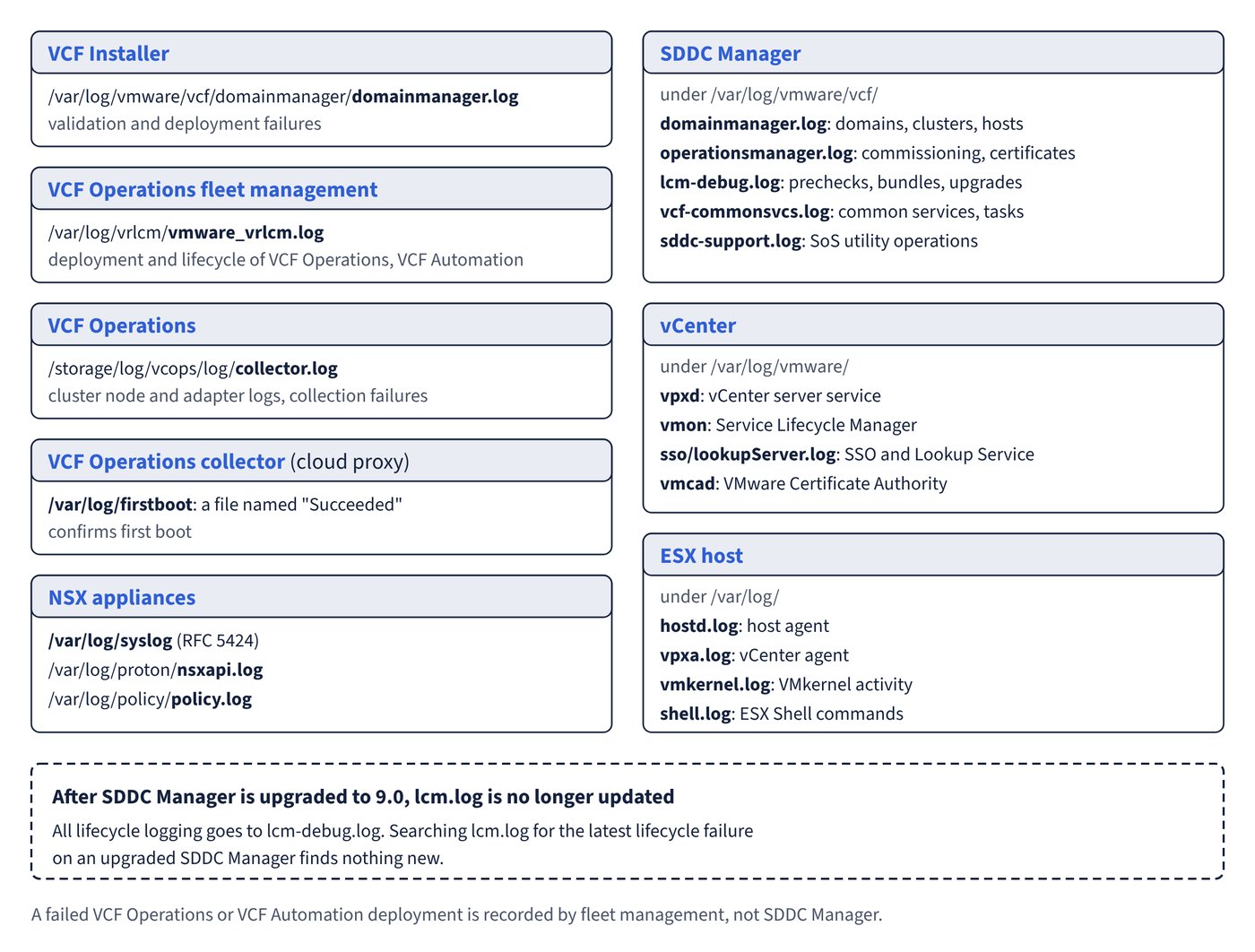
VCF management appliances
| Appliance | Log | What it records |
|---|---|---|
| VCF Installer | /var/log/vmware/vcf/domainmanager/domainmanager.log |
Validation and deployment failures (domain manager service) |
| SDDC Manager | /var/log/vmware/vcf/domainmanager/domainmanager.log |
Workload domains, clusters, hosts, network and storage operations |
| SDDC Manager | /var/log/vmware/vcf/operationsmanager/operationsmanager.log |
Host commissioning and validation, DNS and NTP checks, certificates, credentials, backups |
| SDDC Manager | /var/log/vmware/vcf/lcm/lcm-debug.log (and lcm.log before 9.0) |
Lifecycle: prechecks, bundles, downloads, upgrades |
| SDDC Manager | /var/log/vmware/vcf/commonsvcs/vcf-commonsvcs.log |
Common services: identity, inventory, credential store, tasks and workflows, and network pools |
| SDDC Manager | /var/log/vmware/vcf/sddc-manager-ui-app/sddcManagerServer.log |
SDDC Manager UI server |
| SDDC Manager | /var/log/vmware/vcf/sddc-support.log |
SoS utility messages; a 9.0.1 known issue shows SoS restore errors here |
| VCF Operations fleet management | /var/log/vrlcm/vmware_vrlcm.log |
Deployment and lifecycle of VCF Operations, VCF Automation and other fleet components; SFTP backup configuration |
| VCF Operations | Administration > Control Panel > Support Logs (browse in the UI); files under /storage/log (for example /storage/log/vcops/log/collector.log) |
Cluster node and adapter logs, collection failures |
| VCF Operations collector (cloud proxy) | /var/log/firstboot (a file named “Succeeded” confirms first boot); /storage/log |
First-boot or registration failure; log partition running out of space |
After SDDC Manager is upgraded to 9.0, all lifecycle logging goes to lcm-debug.log and lcm.log is no longer updated. To read SDDC Manager logs, SSH in as the vcf user and use su to become root where needed.
vCenter
Most vCenter logs are under /var/log/vmware/<service_name>.
| Directory or file | Service |
|---|---|
/var/log/vmware/vpxd |
vCenter server service (vpxd) |
/var/log/vmware/vmon |
Service Lifecycle Manager (vmon) |
/var/log/vmware/applmgmt |
Appliance Management Service (VAMI) |
/var/log/vmware/rhttpproxy |
HTTP reverse proxy |
/var/log/vmware/vpostgres |
Postgres database |
/var/log/vmware/sso/ and /var/log/vmware/sso/lookupServer.log |
vCenter Single Sign-On and Lookup Service |
/var/log/vmware/vmcad/vmcad-syslog.log |
VMware Certificate Authority (VMCA) |
/var/log/vmware/vmafdd/vmafdd-syslog.log |
VMware Endpoint Certificate Store (VECS) |
/var/log/vmware/vmdird/ |
VMware Directory Service |
/var/log/vmware/vsphere-ui/logs (main file vsphere_client_virgo.log) |
vSphere Client |
/var/log/vmware/eam, content-library, vmware-sps, vcha |
ESX Agent Manager, Content Library, Profile-Driven Storage, vCenter HA |
/var/log/firstboot |
First-boot logs |
In the appliance shell, showlog followed by a space and Tab lists the contents of /var/log, for example showlog /var/log/firstboot/cloudvm.log.
ESX
The ESX system logs page places them in /var/run/log, and the log file locations table lists them by their /var/log paths. They can also be read from the DCUI under View System Logs.
| Log | Contents |
|---|---|
/var/log/hostd.log |
Host agent that manages the host and its VMs |
/var/log/vpxa.log |
vCenter agent (present when the host is managed by vCenter) |
/var/log/vmkernel.log |
VMkernel activity related to VMs and ESX |
/var/log/vmkwarning.log |
VMkernel warnings |
/var/log/vmksummary.log |
Uptime and availability statistics |
/var/log/syslog.log |
General system messages |
/var/log/auth.log |
Local authentication events |
/var/log/shell.log |
Commands typed in the ESX Shell and shell events |
vmware.log in the VM’s directory |
VM power events, VMware Tools, vMotion, hardware changes |
NSX
NSX appliances write to /var/log, with syslog messages in /var/log/syslog (RFC 5424 format; ESX hosts use RFC 3164). Other documented files include /var/log/nsx-audit.log, /var/log/policy/policy.log and /var/log/proton/nsxapi.log. The NSX CLI can display them:
get log-file <auth.log | controller | controller-error | http.log | kern.log | manager.log | node-mgmt.log | syslog> [follow]Messages of severity emergency, alert, critical or error carry an error code in the structured data. NSX raises an alarm if it cannot write a local log file or reach a third-party remote syslog server, but not if it fails to send to the VCF Operations for logs agent.
Common trap: Searching
lcm.logon an upgraded SDDC Manager for the latest lifecycle failure - from SDDC Manager 9.0 all lifecycle logging goes tolcm-debug.logandlcm.logstops being updated.
Common trap: Reading SDDC Manager logs to diagnose a failed VCF Operations or VCF Automation deployment - those components are deployed by VCF Operations fleet management, so the evidence is in
/var/log/vrlcm/vmware_vrlcm.logon the fleet management appliance.