An independent study guide for VMware Certified Professional – VMware vSphere Foundation Support · by Tony Rough
Know where a vSphere Foundation fault lives, which log or tool shows it, and the fix.
Due on Amazon in November 2026, in Kindle and paperback editions.
This independent study guide for the VMware Certified Professional – VMware vSphere Foundation Support (VCP-VVF Support) exam turns what 2V0-18.25 expects you to understand into the symptoms, causes, fixes and traps that real VVF support work depends on. The exam is based on the 9.0 release, and the book is too, written from Broadcom's own 9.0 documentation and the Knowledge Base articles it cites.
Seventeen chapters, each one readable on its own, that together cover every exam objective:
There are no exam questions in this book. It explains the knowledge the exam looks for, so you can reason through scenarios you have never seen and bring the same method to a real vSphere Foundation fault.
Written by Tony Rough, a cloud architect with over twenty years in IT infrastructure, whose VMware certifications include the VCAP-DCA in data centre administration.
Part of the Ultra Transcenders series from Distilled Press. An independent publication, not affiliated with, sponsored by or endorsed by Broadcom Inc. VMware, VMware vSphere Foundation, vSphere and vSAN are trademarks of Broadcom Inc. and/or its subsidiaries.
Every skill area in Broadcom's 2V0-18.25 outline (as of November 2026), and the chapters that cover it.
| Skill area | Weight | Chapters |
|---|---|---|
| Objective 5.1 Troubleshooting the Deployment of VMware vSphere Foundation (VVF) Solution | — | 1, 2 |
| Objective 5.2 Troubleshooting the Deployment of VMware vSphere Foundation (VVF) - VVF Upgrade | — | 3 |
| Objective 5.3 Troubleshooting a VMware vSphere Foundation (VVF) - Clusters | — | 3, 4 |
| Objective 5.4 Troubleshooting a VMware vSphere Foundation (VVF) Deployment - License Management | — | 5 |
| Objective 5.5 Troubleshooting a VMware vSphere Foundation (VVF) Deployment - Compute | — | 6, 7, 8, 9 |
| Objective 5.6 Troubleshooting a VMware vSphere Foundation (VVF) Deployment - Storage | — | 10, 11, 12 |
| Objective 5.7 Troubleshooting a VMware vSphere Foundation (VVF) Deployment - Networks | — | 13 |
| Objective 5.8 Troubleshooting a VMware vSphere Foundation (VVF) - VCF Operations | — | 14, 15, 16 |
| Objective 5.9 Troubleshooting a VMware vSphere Foundation (VVF) - VCF Operations Orchestrator | — | 17 |
Plus an appendix glossary of 400+ terms, each linked to Broadcom TechDocs, with the same terms explained free online for print readers.
Short excerpts from the book, exactly as they appear in it, so you can see how it explains things.
The opening of chapter 1 · Chapter 1: Troubleshooting VVF 9.0: method, components and tools
VMware vSphere Foundation (VVF) 9.0 is a smaller platform than VMware Cloud Foundation (VCF), even though the two share an installer, a documentation set and most of their tool names. Good support work starts by knowing which parts are present, because a fix written for a component that was never deployed wastes time at best. This chapter sets out what a VVF deployment contains, gives a method to work through any fault, and points to the right tool and log for each layer. Detail on each component stays in its own chapter.
A comparison table · Chapter 1: Troubleshooting VVF 9.0: method, components and tools · What a VVF 9.0 private cloud contains
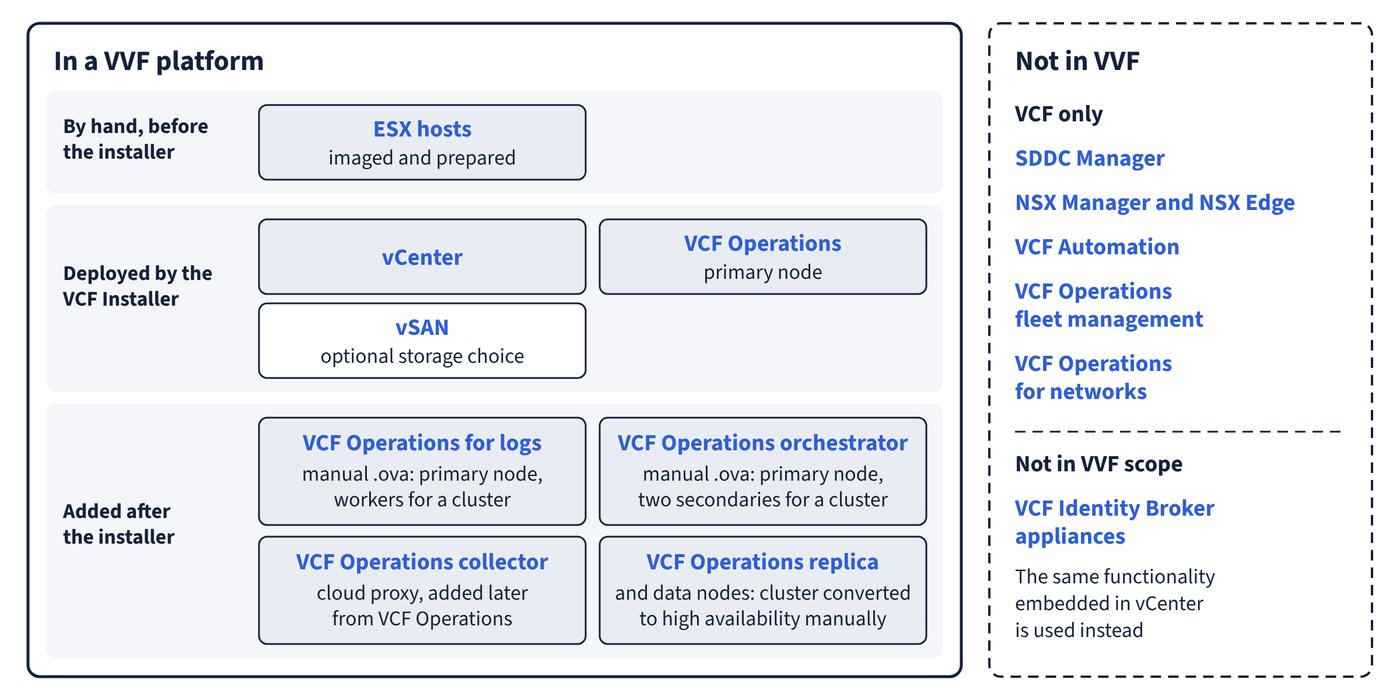
VMware vSphere Foundation is described by Broadcom as a workload platform that serves as the core foundation for VCF, and it does not include the cloud management and integrated automation capabilities of VCF. The deployment documentation spells this out appliance by appliance, in two scope tables: one for what the VCF Installer deploys, and one for what must be added afterwards.
| Component or appliance | In a VVF platform? | How it gets there |
|---|---|---|
| ESX hosts | Yes | Imaged and prepared by hand before the installer runs |
| vCenter | Yes | Deployed by the VCF Installer |
| VCF Operations (primary node) | Yes | Deployed by the VCF Installer |
| vSAN | Optional storage choice | Chosen as the storage option in the installer; a vSAN capacity licence comes with the VVF subscription |
| VCF Operations (replica and data nodes) | Not by the installer | The installer deploys Simple mode only; the cluster can be converted to high availability manually afterwards |
| VCF Operations collector (cloud proxy) | Supported, not by the installer | Added later from VCF Operations |
| VCF Operations for logs | Yes, after the installer | Manual .ova deployment: a primary node, plus worker nodes for a cluster |
| VCF Operations orchestrator | Yes, after the installer | Manual .ova deployment: a primary node, plus two secondary nodes for a cluster |
| VCF Identity Broker appliances | No | Not in VVF scope; the same functionality embedded in vCenter is used |
| VCF Operations fleet management | No | VCF only |
| SDDC Manager | No | VCF only |
| NSX Manager and NSX Edge | No | VCF only |
| VCF Automation | No | VCF only |
| VCF Operations for networks | No | VCF only |
A common trap · Chapter 1: Troubleshooting VVF 9.0: method, components and tools · What a VVF 9.0 private cloud contains
Common trap: The appliance file is named
VCF-SDDC-Manager-Appliance, so VVF must have an SDDC Manager - the same.ovadelivers both the installer and SDDC Manager, but the VVF column of the scope table says No for SDDC Manager. After a VVF deployment there is no SDDC Manager to log in to.


Some sections of the book, free to read online:
Where to start with a VVF fault: the VCF Installer, VCF Operations features, or a component's own tools.
Where to find logs for ESX, vCenter, the VCF Installer and the VCF Operations products.
How the starting state of an existing vSphere environment decides the path to VVF 9.0.
What evaluation mode allows, what happens when a licence expires, and how recovery works.
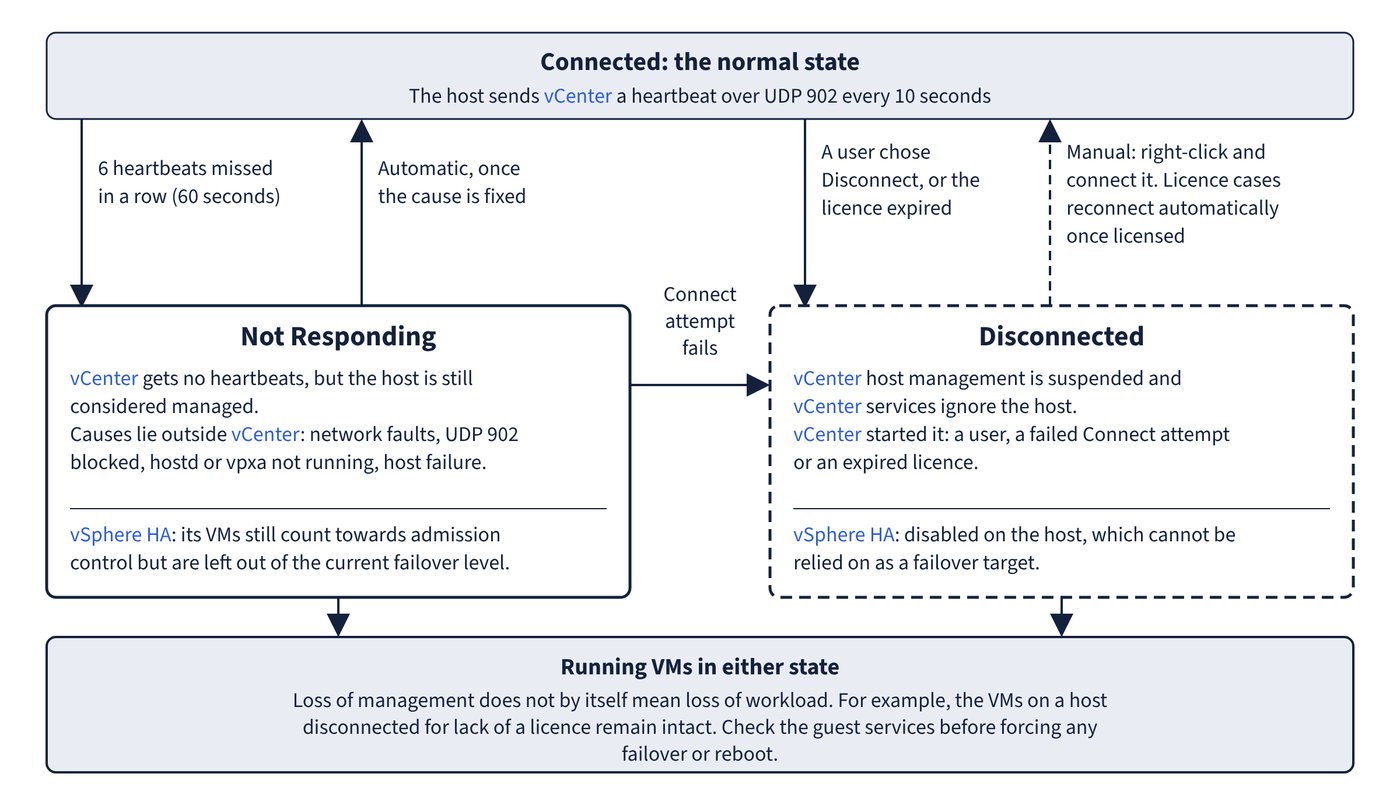
What Connected, Not Responding and Disconnected mean, and what each means for running VMs.
What each vSphere HA agent state says about a host, and what it means for failover.
Which objects stay available after each single failure in a vSAN stretched cluster.
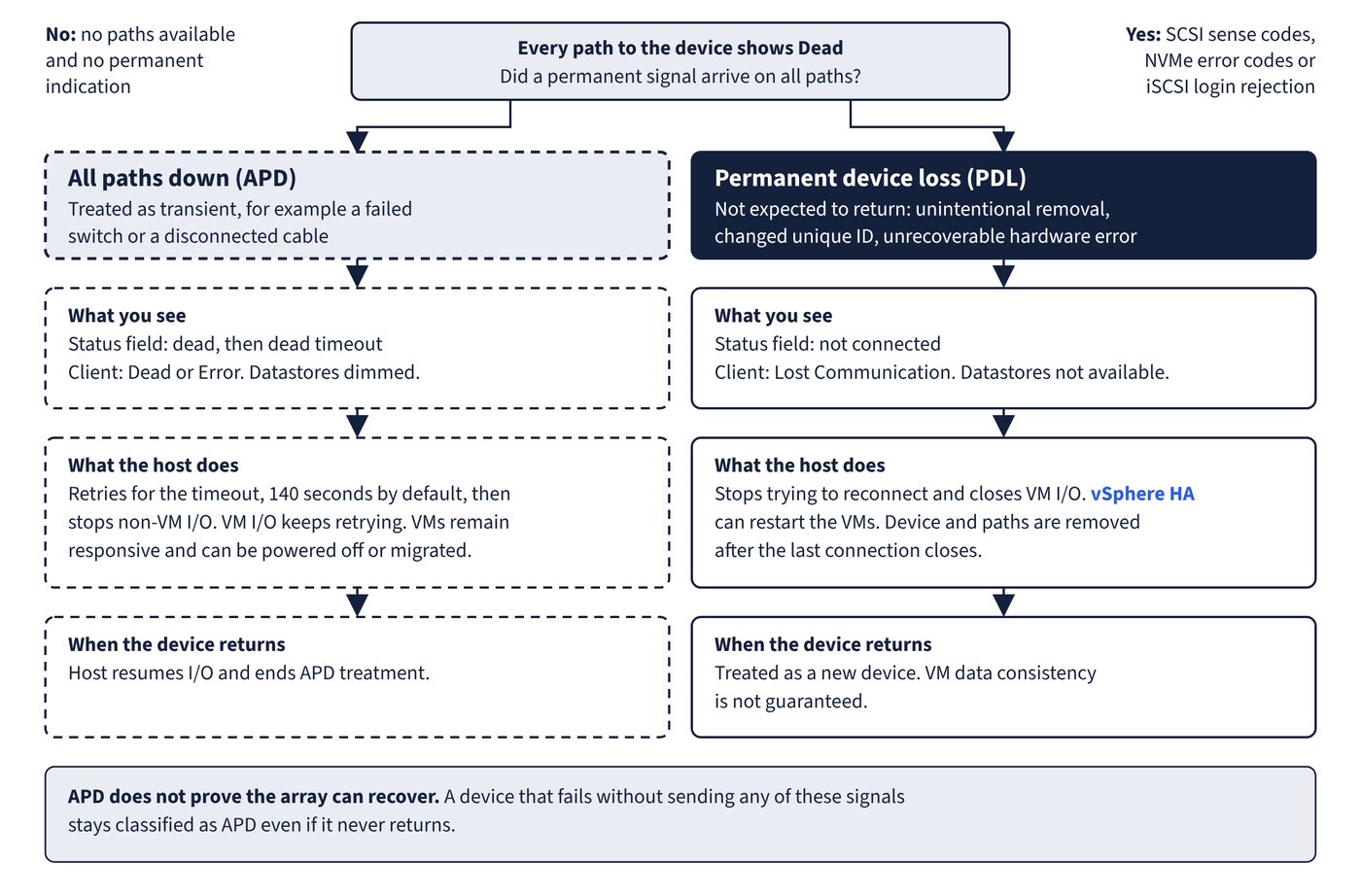
How to tell All Paths Down from Permanent Device Loss on ESX, and what each does to VMs.
A free week-by-week plan through the book at a 4-week or 8-week pace, with the study notes and exam skill areas for each week.