vCenter reports a state for each host’s vSphere HA agent, and the error states mean protection is reduced. For Agent Unreachable, Uninitialized and Initialization Error, the pages define the problem as the state lasting a minute or more. Figure 9.1 shows the hosts and how the states differ.
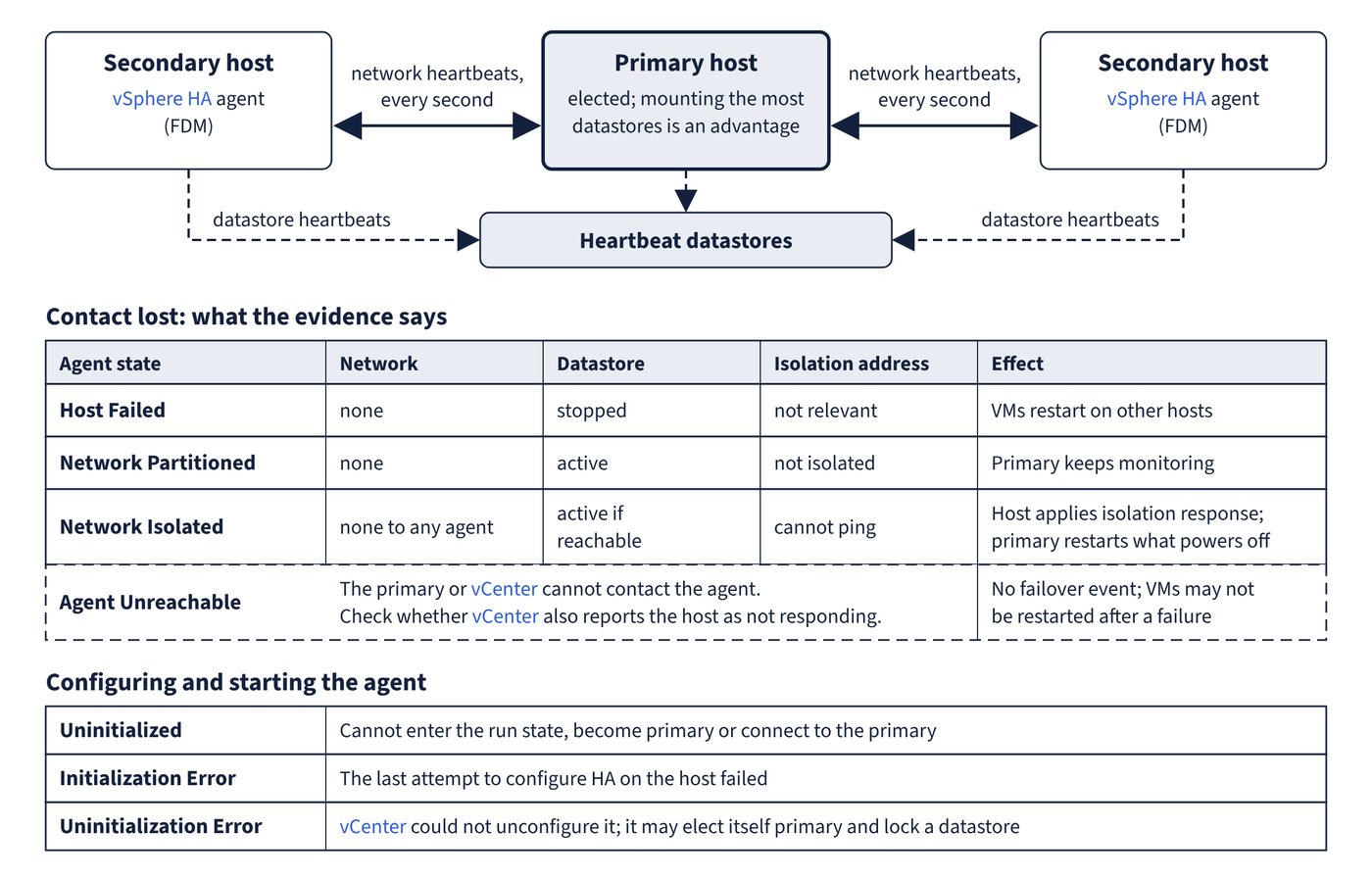
| State | What it means | Most likely cause | Evidence | Fix |
|---|---|---|---|---|
| Agent Unreachable | The primary or vCenter cannot contact the agent; VMs may not be restarted after a failure | Network problem, or all cluster hosts failed; less often HA was deactivated and reactivated while vCenter could not reach the agent, or the ESX host agent failed and the watchdog could not restart it | Is vCenter also reporting the host as not responding? | Resolve the network, agent or cluster failure. If the host is responding but the state remains, reconfigure HA on the host |
| Uninitialized | The agent cannot enter the run state, become primary or connect to the primary | Most often no access to any datastore; less often no access to the local datastore where HA caches state, inaccessible agent, firewall ports, or a stopped ESX host agent | Host events: vSphere HA Agent for the host has an error gives the reason |
Fix datastore access, restart the host agent, or stop any other service using port 8182. Reconfigure HA if the state stays |
| Initialization Error | The last attempt to configure HA on the host failed | vCenter lost the host during install; agent did not become primary or secondary in time; disk or memory shortage; pending reboot | The reason on the failed Configure HA task | See the failure reasons in the next section |
| Uninitialization Error | vCenter could not unconfigure the agent during Unconfigure HA, usually a lost connection | Connection lost mid-task | The agent may elect itself primary and lock a datastore, blocking the valid primary | Add the host back to vCenter, as a stand-alone host or to any cluster |
| Host Failed | The primary cannot reach the host or its heartbeat datastores | A real host failure, or a storage failure combined with a network failure | Check host power and state, the network path and the heartbeat datastores | Resolve the conditions. An incorrect report still blocks protection of the VMs on that host |
| Network Partitioned | The primary reaches the host only through heartbeat datastores, and the host is not isolated | Wrong VLAN tag, failed NIC or switch, IPv4-only hosts mixed with IPv6-only hosts, management network moved to another switch without maintenance mode | Management (or vSAN) network tests between hosts | Resolve the network problem |
| Network Isolated | The host cannot ping its isolation addresses and cannot reach any other agent | Network failure on that host’s HA network and the path to the isolation address | Isolation address reachability; on vSAN, both the vSAN network and the isolation address | Resolve the network problem, including the path to the isolation address |
Host events are the first stop for an agent error. For the agent’s own record, ESX system logs live in /var/run/log; the fdm log (Fault Domain Manager, the vSphere HA agent) has a recommended rotation of 5 MB per file, ten files, 50 MB in all. The DCUI option Restart Management Agents also restarts FDM if it is installed, but anyone connected through the vSphere Client or vCenter loses connectivity while it runs.
Common trap: Treating an Uninitialization Error as a harmless leftover on a host being removed - the orphaned agent can elect itself primary and lock a datastore, which stops the valid primary managing VMs whose configuration files are on that datastore.