Two different clocks can disconnect hosts from vCenter: the 90-day evaluation period and licence expiry. Telling them apart decides the recovery path, because the fix for each one starts somewhere different.
Evaluation mode applies to new deployments and to upgrades from version 8, and lasts up to 90 days per component.
| Component | When the 90 days start | Recovery if it runs out |
|---|---|---|
| ESX 9.0 host | First boot after install or upgrade, not when it joins vCenter | Add the host to a vCenter instance holding a valid licence with enough available capacity |
| vCenter 9.0 | Deployment or upgrade | Assign a valid licence from VCF Operations |
| VCF Operations 9.0 | Deployment or upgrade | Register the instance and add a valid licence |
| vSAN | Until licensed, usable for up to 90 days | Assign the VMware vSAN licence after the primary licence |
| Stateless ESX host from Auto Deploy | No evaluation period in 9.0 | Needs a licence from the start |
Licence expiry occurs when the subscription ends, or when usage is not reported and the licence is not refreshed. The sequence is:
- Notifications are displayed before expiry.
- After expiry there are 90 days to update the licence. Licence assignments are affected, and notifications appear in most components including VCF Operations and vCenter.
- Beyond those 90 days, enforcement begins, as the next table shows.
| Enforcement effect | Detail |
|---|---|
| Management operations | Prevented on various components |
| ESX hosts | Disconnect from vCenter; most host management operations are prevented |
| Workloads | Cannot be created or started |
| Running workloads | Not proactively stopped |
The scope of an expired evaluation depends on which clock ran out. If a vCenter’s period expires, all of its hosts disconnect. If one host’s period expires under a licensed vCenter, only that host disconnects.
Recovery is automatic once licensing is valid again. After a valid licence is assigned, or capacity becomes available, or usage is submitted and the licence refreshed, disconnected hosts reconnect by themselves, unless they were added to another vCenter in the meantime. Virtual machines on a disconnected host remain intact. Figure 5.1 draws the whole lifecycle, including this way back.
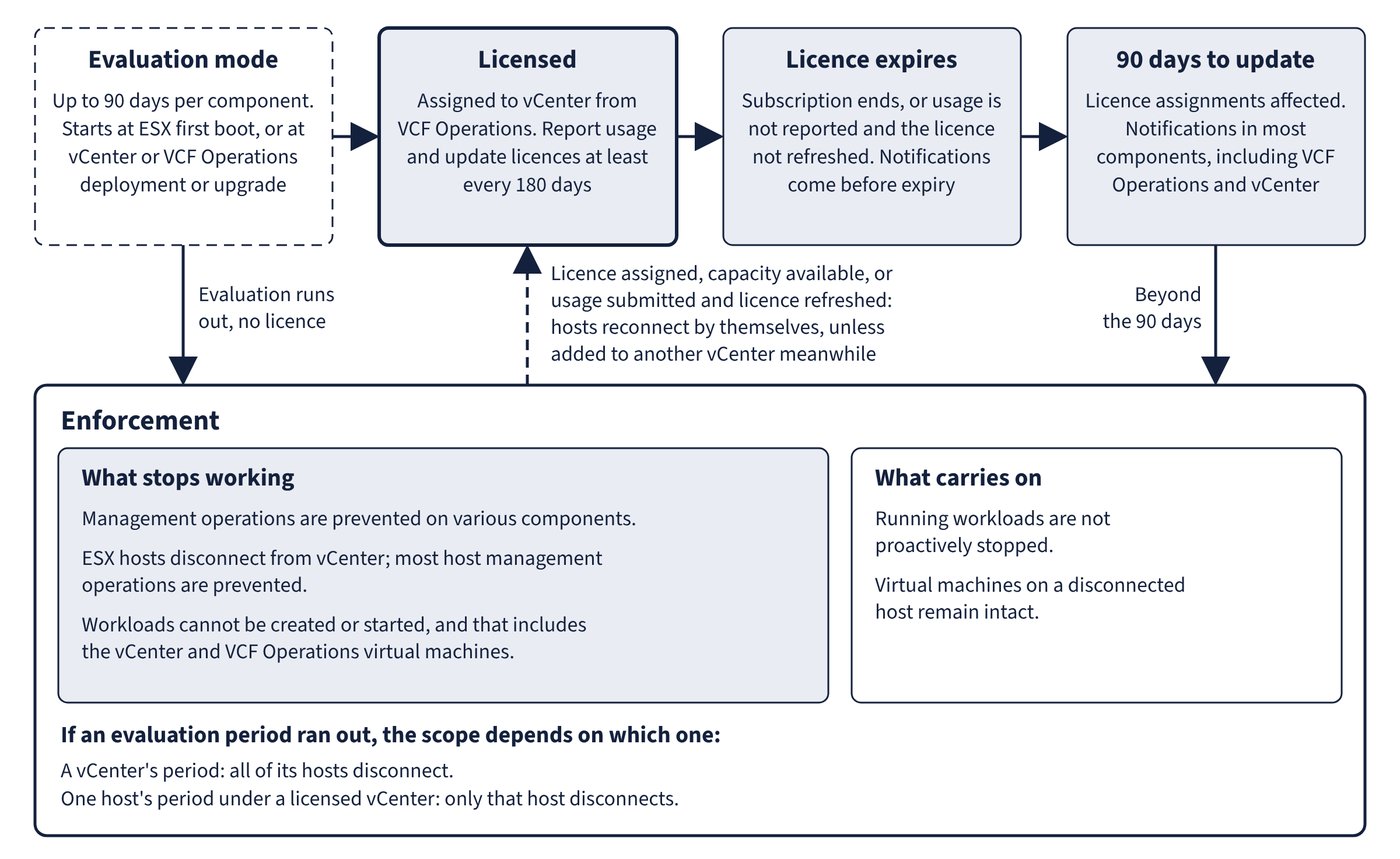
The awkward case is when the management appliances themselves have stopped. Workloads cannot start after expiry, and that includes the vCenter and VCF Operations virtual machines.
| Situation | Documented way out |
|---|---|
| vCenter or VCF Operations appliance powered off, evaluation expired | Move the appliance to a licensed host and start it there |
| No licensed host exists | Reinstall ESX on a host, which restarts its 90-day evaluation, then start the appliances |
| VCF Installer fails with “Host is disconnected or powered off” after a vCenter upgraded to 9.0 went unlicensed | Deploy the VCF Operations OVA directly to an ESX host and configure the licence; reinstall one host if the host’s own period has also run out |
| Licences expired and VCF Operations is unavailable | Install a standalone ESX host in evaluation mode, deploy a new VCF Operations there from the Host Client, register the vCenter, and apply the licence so the licence reaches the hosts |
VCF Operations for logs has a licensing dependency of its own. It must integrate with a version 9 vCenter licensed with vSphere Foundation or VCF, and at least one such integration must collect logs directly into the VCF Operations for logs cluster. A vCenter whose log collection goes only through a collector or collector group does not meet that requirement. See “VCF Operations for logs” for the rest of that integration.
Common trap: Trusting a “60 days” message - the ESX installer’s completion screen, and the VCF Installer when custom networking is selected for a new VCF fleet, both show 60 days, and the release notes record each as a known issue. The evaluation period is 90 days.
Common trap: Assuming an expired licence powers virtual machines off - running workloads are not proactively stopped. The danger is that nothing can be started, so avoid rebooting or shutting down hosts and appliances until the licence is restored.
Common trap: Reconnecting hosts one by one after restoring a licence - hosts reconnect automatically when a valid licence is assigned. Adding them to a different vCenter in the meantime breaks that automatic path.