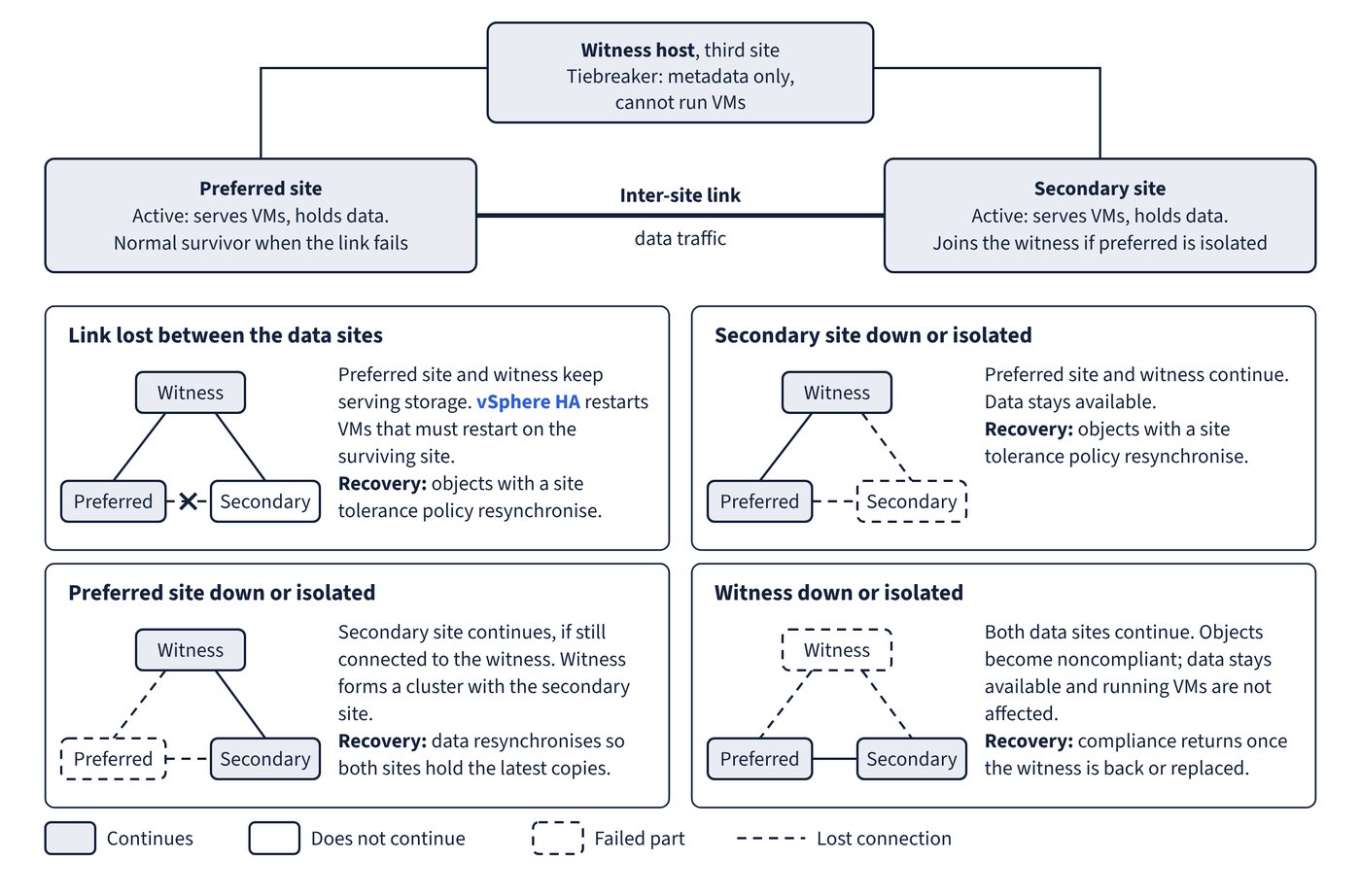
A stretched cluster can tolerate one link failure at a time without data becoming unavailable, and in most cases it recovers automatically once the failure is fixed. The table below is the behaviour to check an outage against, so that expected behaviour is not mistaken for a fault. Figure 11.1 shows each single failure on the layout.
| Failure | What continues | What vSAN does | On recovery |
|---|---|---|---|
| Link lost between the data sites | Preferred site and witness keep serving storage | vSphere HA restarts VMs that must restart on the surviving site | Objects with a site tolerance policy resynchronise |
| Secondary site down or isolated | Preferred site and witness | Data stays available | Objects with a site tolerance policy resynchronise |
| Preferred site down or isolated | Secondary site, if still connected to the witness | Witness forms a cluster with the secondary site | Data resynchronises so both sites hold the latest copies |
| Witness down or isolated | Both data sites | Objects become noncompliant; data stays available and running VMs are not affected | Compliance returns once the witness is back or replaced |
| One site down, then witness fails | Remaining site, with Site mirroring | Objects are noncompliant but stay accessible | Resynchronisation after the site returns |
Local protection changes what survives inside a site. With the Site disaster tolerance rule set to Site mirroring and an FTT value applied, FTT sets how many additional host failures an object tolerates. With this local protection, the cluster can repair missing or broken components in the available site even when the other site is unavailable. With three hosts per site, as a VCF design requirement notes, vSAN will not automatically rebuild objects after a local failure.
Provisioning during an outage
If one site is inaccessible, whether a data site or the witness host, new VMs can still be provisioned on the operational part of the cluster. These are implicitly force provisioned and stay noncompliant until the partitioned site rejoins. With vSAN 9.0, new VMs are created to comply with the lower failures to tolerate in the policy, which improves their tolerance when that value is one or more. Even so, create them only if necessary, as they are exposed to data loss on any additional failure.
Disk-full behaviour across sites
vSAN keeps serving I/O if a disk on one site reaches 96 percent full or 5 GB free, whichever is less, while disks on the other site still have space. Components on the affected site are marked absent, and I/O continues to the healthy copies on the other site. When the affected disks fall to 94 percent or 10 GB, again whichever is less, the absent components become available, vSAN resyncs them and all objects return to compliance.
So absent components on one site, with no host or network failure in sight, may simply mean that site has run out of space. Check capacity per site. The vSAN Stretched Clusters dashboard in VCF Operations shows CPU, memory and disk capacity for the preferred and secondary sites.
Common trap: Assuming the preferred site always survives a partition - if it is isolated from both the secondary site and the witness, the witness forms a cluster with the secondary site. The site that leads to maximum data availability stays in operation.
Common trap: Treating a failed witness as a production outage - data stays available and running VMs are not affected. Objects become noncompliant, and a further site failure is now the risk, so replace the witness promptly without stopping workloads.