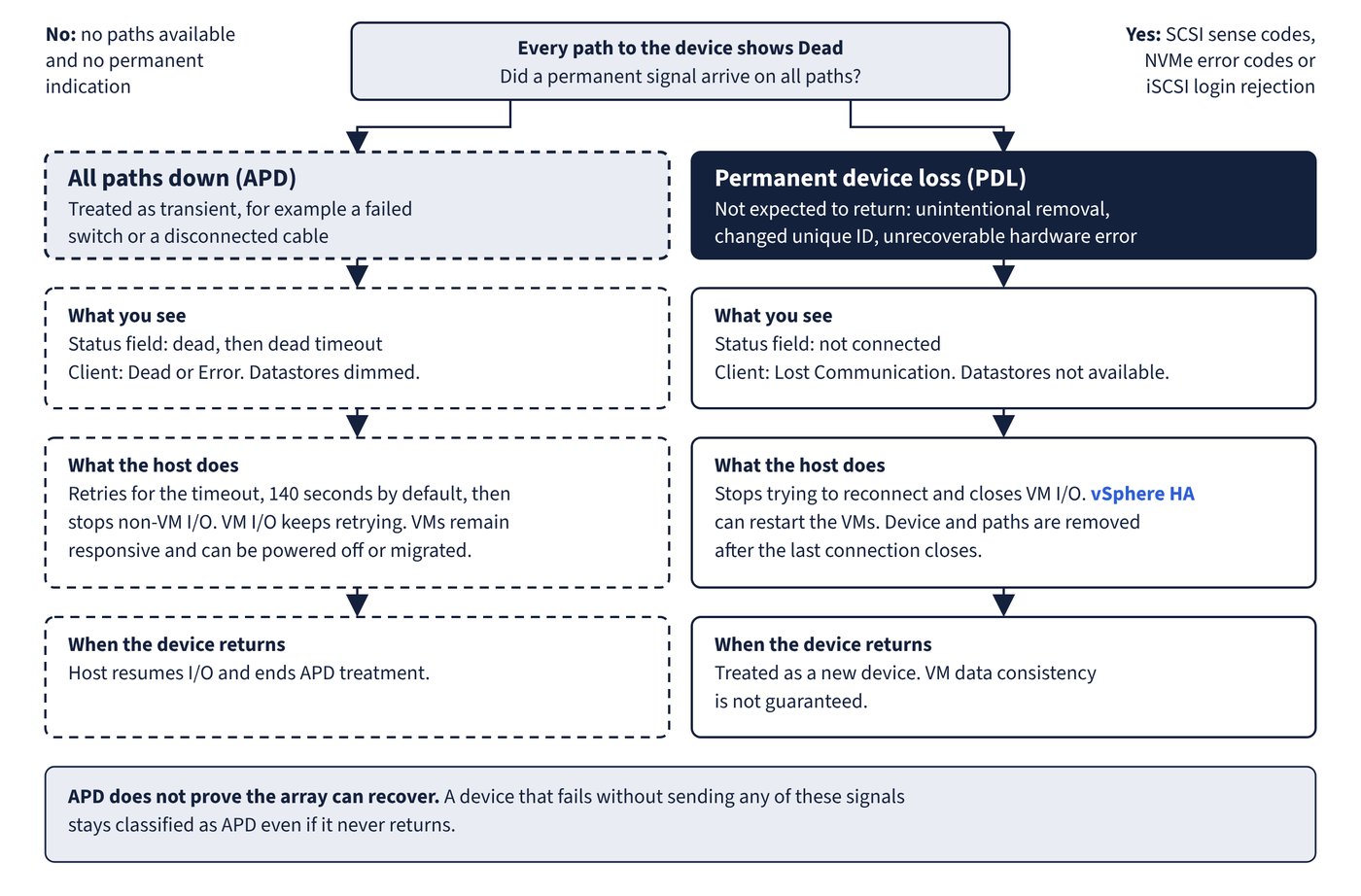
The host separates temporary loss from permanent loss, and the correct response is opposite in each case. All paths down (APD) is treated as transient, for example after a failed switch or disconnected cable. Permanent device loss (PDL) means the device is not expected to return, for example after unintentional removal, a changed unique ID or an unrecoverable hardware error.
| Attribute | APD | PDL |
|---|---|---|
| How the host knows | No paths available and no permanent indication | SCSI sense codes, NVMe error codes or iSCSI login rejection, received on all paths |
esxcli Status field |
dead, then dead timeout when the timer expires |
not connected |
| Operational state in the client | Dead or Error | Lost Communication |
| Paths | All Dead | All Dead |
| Datastores | Dimmed | Not available |
| Host behaviour | Retries for the timeout, then stops non-VM I/O while VM I/O keeps retrying | Stops trying to reconnect and closes VM I/O |
| Virtual machines | Remain responsive; can be powered off or migrated | I/O closed; vSphere HA can restart them |
| On recovery | Host resumes I/O and ends APD treatment | Treated as a new device; VM data consistency is not guaranteed |
| Automatic removal | None documented | Device and paths removed after the last connection closes |
A healthy device shows on in the Status field. Figure 12.1 sets the two outcomes side by side.
Evidence in the VMkernel log
A PDL sense code in the VMkernel log looks like this. NVMe devices show H:0x0 D:0xb P:0x0 or H:0x0 D:0x11a P:0x0 instead.
H:0x0 D:0x2 P:0x0 Valid sense data: 0x5 0x25 0x0On iSCSI arrays with a single LUN per target, PDL shows as a login rejected with the reason Target Unavailable, on all paths. A device that fails without sending any of these signals stays classified as APD even if it never returns, so an APD reading does not prove the array can recover.
Timers and advanced settings
| Setting | Default | Range or effect |
|---|---|---|
Misc.APDTimeout |
140 seconds | 20 to 99999 seconds |
Misc.APDHandlingEnable |
Activated (1) | 0 means endless retries; VMs can exceed I/O timeouts and fail, and the host might disconnect from vCenter |
Disk.AutoremoveOnPDL |
Automatic removal on | 0 deactivates automatic removal of paths |
Raise the timeout only if devices genuinely take longer than 140 seconds to recover. A change made after the device has gone down does not apply to that incident. Setting Misc.APDHandlingEnable back to 1 during an APD event turns the feature on at once and starts the timer.
Recovery and planned removal
| Situation | Documented steps, in order |
|---|---|
| Unplanned PDL | Power off and unregister VMs on the datastore; unmount the datastore; rescan all hosts that had access |
| Rescan does not clear the device | Find active references: VMs, templates, ISO images, raw device mappings |
| APD expired | Fix the path fault; power off or migrate VMs if needed; I/O resumes when paths return |
| Planned removal | Migrate VMs; unmount; detach; for iSCSI with one LUN per target, delete the static target from each HBA with a path; reconfigure on the array; reattach; mount and restart VMs |
Detaching a device requires that it holds no datastore, is not used as an RDM, and has no diagnostic or scratch partition. Its state becomes Unmounted, and shared devices must be detached from each host. Before unmounting a datastore, confirm that no VMs or CNS volumes reside on it, Storage DRS does not manage it, Storage I/O Control is off, and vSphere HA does not use it for heartbeating. HA heartbeating does not block the unmount, but losing it might cause the host to fail and restart active VMs.
VM Component Protection (VMCP) is the cluster response to these states, configured under Failures and Responses in vSphere Availability. Host Monitoring and VM Restart Priority must both be on, or VMCP can only monitor and raise events. HA behaviour as a whole belongs to the chapter on vSphere clusters.
| Failure | VMCP response options |
|---|---|
| Datastore with PDL | Disabled, Issue Events, Power off and restart VMs |
| Datastore with APD | Disabled, Issue Events, Power off and restart VMs with a Conservative or Aggressive restart policy; Response recovery sets the wait in minutes |
Remote boot devices add one behaviour new in 9.0. ESX monitors a SAN boot device that contains the ESX-OSData partition. If that device enters APD or PDL and does not recover, ESX stops with a purple diagnostic screen to avoid corruption, as KB 380716 describes. A host that fails this way after a SAN event needs its boot path investigated, not its CPU or memory.
Common trap: Raising
Misc.APDTimeoutwill rescue a device that is already down - the new value does not take effect for that APD incident, and the timer only limits how long non-VM I/O is retried.
Common trap: A PDL device that comes back can simply be used again - the host treats it as a new device and data consistency for VMs on it is not guaranteed, so plan to verify those VMs and their data.