The state in the inventory shows whether recovery will be automatic, so establish it first.
vCenter manages a host through two agents on that host. The vCenter agent, vpxa, is the communication conduit to the host daemon, hostd, which in turn communicates with the ESX kernel. Hostd is the agent that manages and configures the host and its virtual machines. The two directions of traffic are worth keeping separate:
- Heartbeats go from host to vCenter over UDP 902, every 10 seconds. Missing 6 in a row, which is 60 seconds, costs the host its normal state. These timings come from a Knowledge Base article that lists versions up to 8.x.
- Management traffic goes from vCenter to host over TCP 902, and Broadcom’s checklist also lists port 443 between the two.
| Not Responding | Disconnected | |
|---|---|---|
| Meaning | vCenter no longer receives heartbeats, but the host is still considered managed | vCenter host management is suspended, and vCenter services ignore the host |
| Started by | Conditions outside vCenter: network faults, UDP 902 blocked, hostd or vpxa not running, host failure | vCenter: a user chose Disconnect, a Connect attempt on a Not Responding host failed, or the host’s licence expired |
| Recovery | Automatic once the cause is fixed | Manual: right-click the host and connect it, even after the cause is fixed |
| vSphere HA | Virtual machines still count towards admission control but are excluded from the current failover level | HA is disabled on the host, and it cannot be relied on as a failover target |
The exception to manual recovery is licensing. Hosts disconnected by licence or evaluation expiry reconnect automatically once a valid licence is in place, as “Licence management” describes. Figure 6.1 shows how a host moves between these states and what each means for running virtual machines.
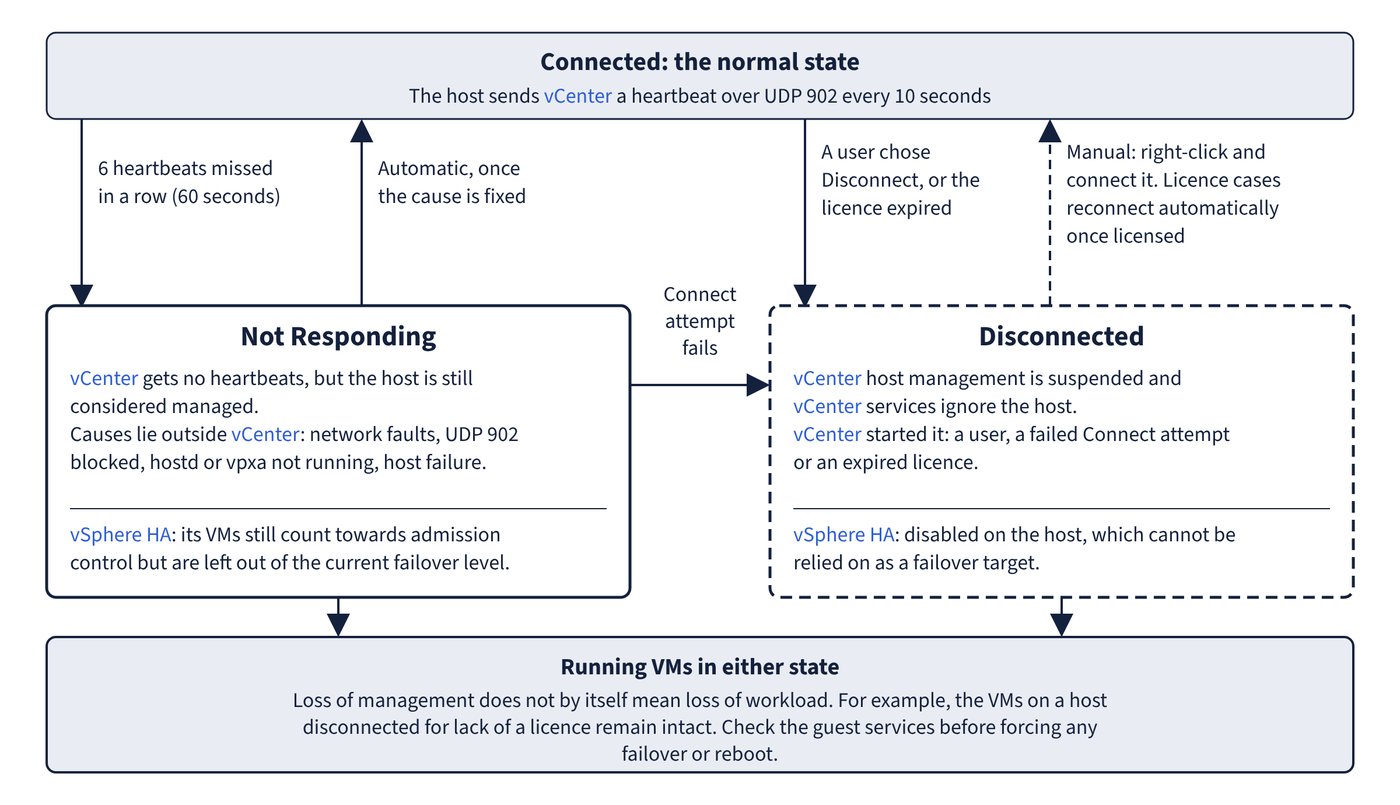
Common trap: Assuming virtual machines are down because the host is greyed out - loss of management does not by itself mean loss of workload. For example, the virtual machines on a host disconnected for lack of a licence remain intact. Check the guest services before forcing any failover or reboot.
Common trap: Waiting for a Disconnected host to come back after fixing the network - only Not Responding recovers automatically. A Disconnected host stays that way until someone reconnects it, unless a licence caused the disconnection.