Scaling happens at the plan level, so every app in the plan is affected. There are two directions: scale up changes the pricing tier (more CPU and memory per instance, plus tier features), and scale out adds instances. (See Figure 10.1.)
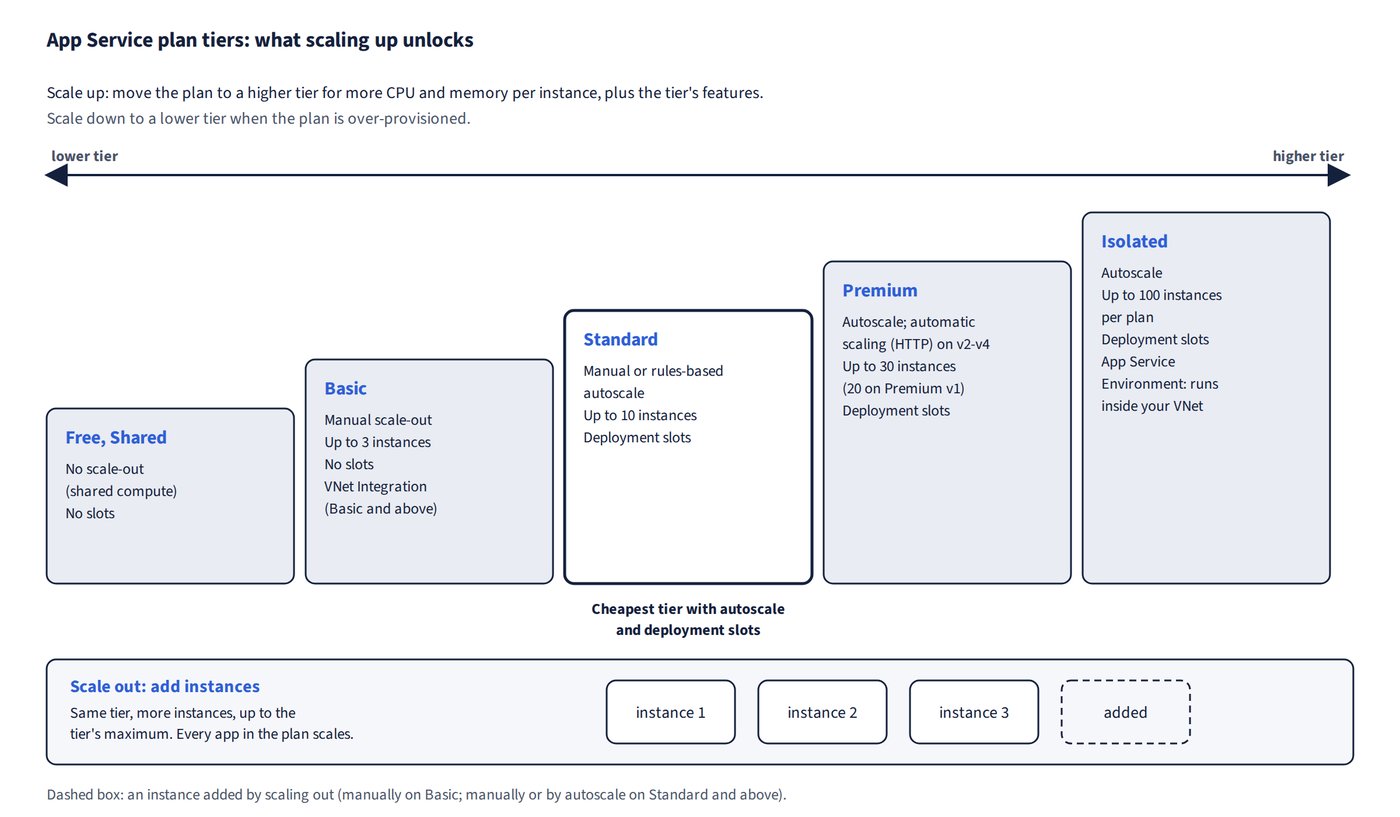
What each tier allows
| Tier | Scale-out | Max instances | Deployment slots |
|---|---|---|---|
| Free, Shared | None | n/a (shared) | No |
| Basic | Manual only | 3 | No |
| Standard | Manual or rules-based autoscale | 10 | Yes |
| Premium, Isolated | Manual or rules-based autoscale (and automatic scaling on Premium v2-v4) | Premium: 30 (20 on the original Premium v1); Isolated: 100 per plan | Yes |
Choosing a scale-out method
- Manual sets a fixed instance count.
- Rules-based autoscale: for CPU-based scaling, in Scale out choose Rules Based (custom autoscale) and add a rule on CPU Percentage (for example, > 80%). Standard is the cheapest tier that supports it, and the cheapest tier that autoscales to 8 instances.
- Automatic scaling scales on HTTP traffic, not a CPU threshold, and is available only on Premium v2-v4.
Common trap: Choosing Automatic scaling to scale on a CPU threshold - automatic scaling reacts to HTTP traffic only, and needs Premium v2-v4; use a Rules Based autoscale rule on CPU Percentage, which Standard already supports.
Common trap: Picking Basic for autoscale because it can have several instances - Basic scales out manually only, to at most 3 instances; Standard (up to 10) is the cheapest tier with autoscale.
Right-sizing
Metrics tell you whether a plan is the right size. A very low average CPU (about 3.7%) means the plan is over-provisioned, so scale down to a lower tier. When reading those metrics, a time granularity of 6 hours gives four data points per day.
How autoscale timing works
Autoscale results depend on three settings working together: the duration, the step and the cooldown.
- A rule fires once the metric has breached its threshold for the full duration.
- Each action moves the instance count by the step and then waits out the cooldown (the minimum gap between actions, not the duration) before re-evaluating the lookback window.
- The count never exceeds the maximum, and it stays at the default when no rule fires.
| Scenario | Result |
|---|---|
| Memory > 70% over 15 min, +1, cooldown 5 min, start 2, max 5; breach lasts 30 min | 3 at ~15 min, 4 at ~20, 5 at ~25; stays 5 |
| CPU > 70% over 10 min, +1, cooldown 5 min, start 1; 15 min at 80% | 2 instances |
| Default 1, max 5, cooldown 5 min; scale-in duration 5 min, 9 min below threshold | Sustained load climbs to 5; 9 min allows one scale-in: 5 → 4 |
Common trap: Treating the cooldown as the time a metric must breach before each step - the duration controls the first trigger; after that, the cooldown is only the minimum gap between actions, which is why scaling continues every 5 minutes in the first scenario.