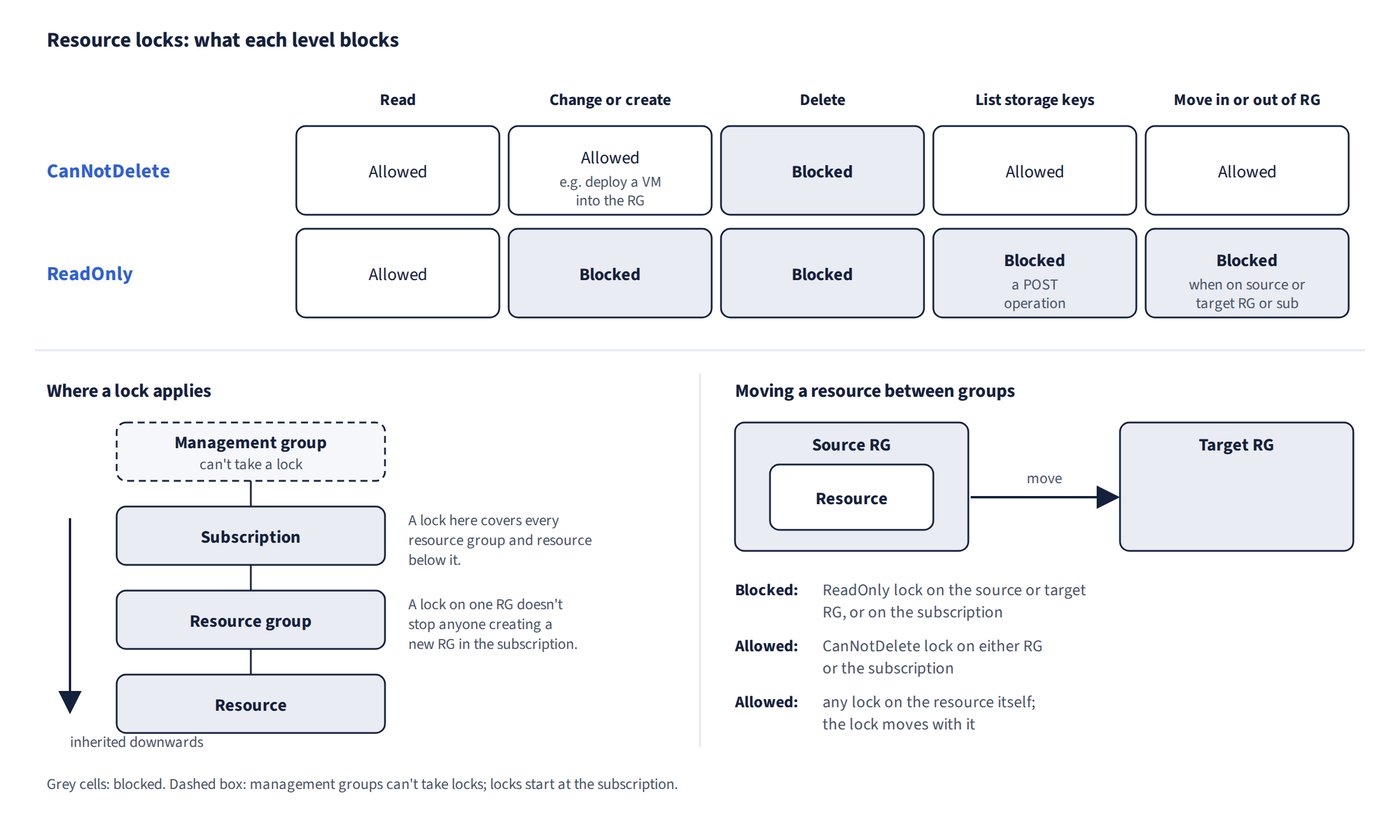
Locks protect resources from accidental deletion or change, regardless of the RBAC permissions of the person making the change. There are only two levels, and they differ in what they allow.
| Lock | Read | Modify / create in scope | Delete | Move into or out of a resource group |
|---|---|---|---|---|
| CanNotDelete (Delete) | Yes | Yes (for example, deploy a VM into the resource group) | No | Allowed |
| ReadOnly | Yes | No | No | Blocked when on the source or target resource group or subscription |
- These are the only two lock levels, created for example with
New-AzResourceLock -LockName L1 -LockLevel ReadOnly -ResourceGroupName <resource group name>.Set-AzResourcedoesn’t manage locks, and container immutability policies or App Configuration read-only locks aren’t Resource Manager locks. - Locks apply to subscriptions, resource groups and resources (not management groups), and to everything below them. Locks on individual resource groups don’t stop someone creating a new resource group in the subscription.
- A lock on an individual resource (either level) doesn’t block moving it. The lock moves with the resource.
- Locks only prevent change or deletion. Use Azure Policy to enforce configuration.
Common trap: Assuming any lock stops resources moving into or out of a resource group - only a ReadOnly lock on the source or target resource group or subscription blocks a move; a CanNotDelete lock, or any lock on the individual resource, doesn’t.
A ReadOnly lock on a storage account also blocks the List Keys operation (it is a POST, and ReadOnly blocks all POST operations), so users can no longer read the access keys and must use Microsoft Entra credentials for blob or queue data; clients that already hold a key can keep using it. (See Figure 3.1.)