The storage firewall decides which networks can reach the account at all. It works alongside authentication rather than replacing it, since a request that passes the firewall still needs a valid key, SAS or role.
Turning the firewall on
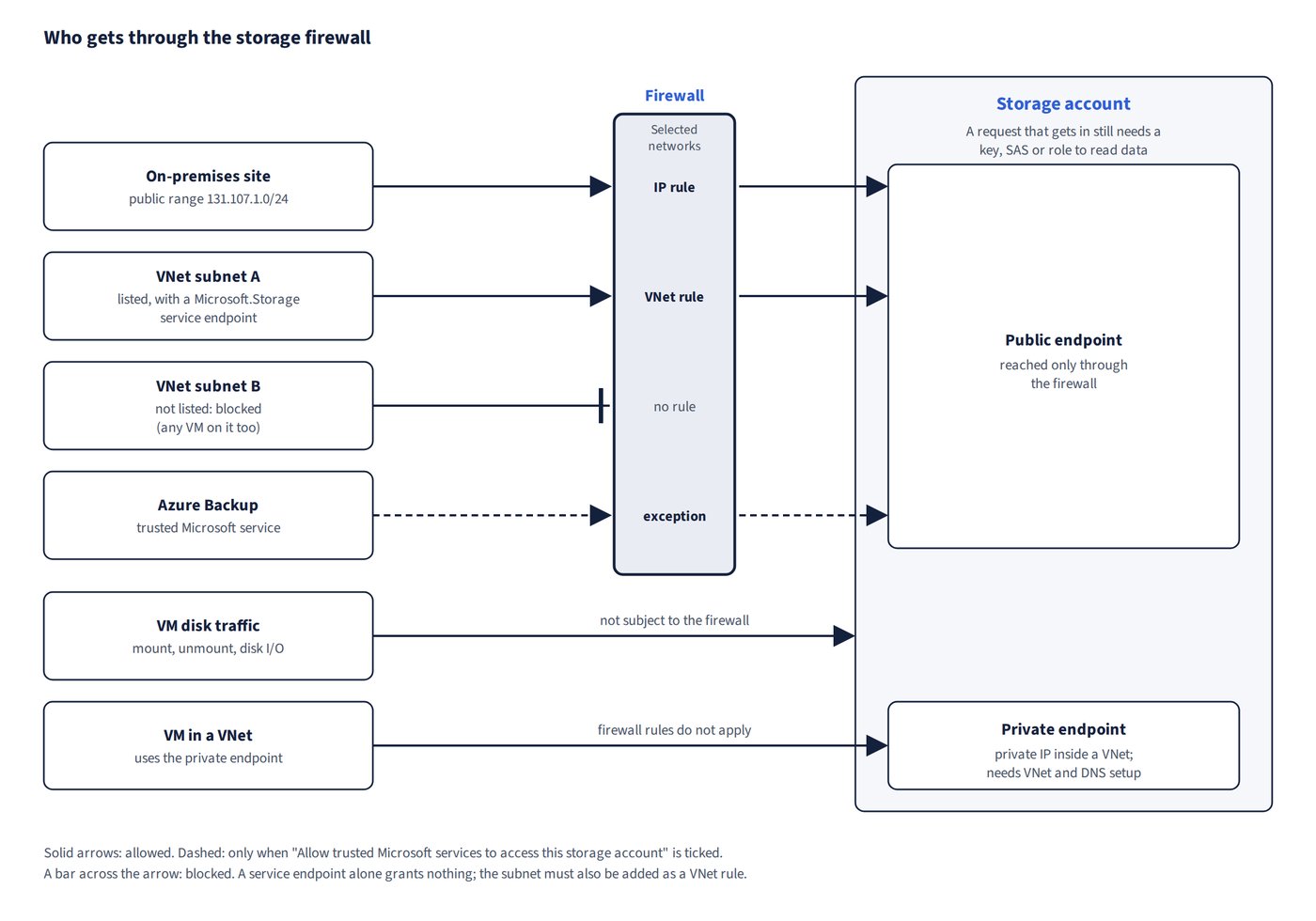
Setting Public network access to “Enabled from selected virtual networks and IP addresses” (Selected networks) turns the firewall on. From then on only the listed VNet subnets and IP/CIDR ranges get in; everything else is blocked, including VMs on any subnet that isn’t listed. It is the least-effort way to admit a chosen set of VNets plus, for example, a home-office public IP address.
Two kinds of rule populate the allow list:
- An IP network rule admits a public address range. To allow uploads from an on-premises site, add its public range (for example
131.107.1.0/24). - A VNet rule admits a subnet, and needs a Microsoft.Storage service endpoint on that subnet. A service endpoint on its own grants nothing: it only makes the subnet eligible to be listed. Don’t add one where it isn’t required.
Exceptions and what the firewall doesn’t cover
- Allow trusted Microsoft services to access this storage account is the exception that lets first-party services through. Azure Backup reaches a firewall-restricted account (historically, for example, one holding unmanaged disks, which were retired on 31 March 2026) only when this exception is on. With it unchecked, backup never works, and there is no temporary “during a backup” firewall mode to fall back on.
Common trap: Assuming Azure Backup can always reach a firewall-restricted storage account - it works only when “Allow trusted Microsoft services to access this storage account” is ticked; when that box is unchecked, backup never works.
- VM disk traffic (mount, unmount and disk I/O) isn’t subject to storage firewall rules, so attaching disks needs no exception.
Common trap: Enabling “Allow trusted Microsoft services to access this storage account” so that a VM can attach its disks - disk traffic isn’t subject to the storage firewall in the first place, so the exception is unnecessary and only widens access.
Private endpoints versus firewall rules
A private endpoint (Private Link) gives the account a private IP address inside a VNet. It needs VNet and DNS configuration and doesn’t admit a home-office public IP, so when the requirement is simply “these VNets plus this public address”, firewall rules are less effort.
Firewall rules restrict only the account’s public endpoint; they don’t affect traffic that reaches the account through a private endpoint. (See Figure 5.2.)
Reading the configuration in a template
In an ARM template, networkAcls.defaultAction: "Allow" with no ipRules or virtualNetworkRules means the account is reachable from all networks and from any location (not just the account’s own region). supportsHttpsTrafficOnly: true only forces HTTPS; it doesn’t restrict which networks can connect.
Settings that are not network controls
These are frequently offered as ways to restrict network access, but none of them does:
| Setting | What it actually controls |
|---|---|
| Routing preference | The path traffic takes (Microsoft network or internet routing) |
| Access control (IAM) | RBAC permissions |
| Load balancing | Traffic distribution, not storage access |
| Azure Firewall rules | Traffic through the Azure Firewall, not the storage account’s own firewall |