A shared access signature (SAS) is a signed URL token that delegates limited, time-boxed access to storage without handing out an account key. Choosing the right type and filling in its fields with least privilege is a core administration skill.
SAS types
| SAS type | Signed with | Scope | Works with Shared Key disabled? |
|---|---|---|---|
| User delegation SAS | Microsoft Entra ID (Azure AD) credentials | Blob storage historically; today also Queue, Table and Azure Files | Yes |
| Service SAS | Account key | One service (e.g. a container) | No |
| Account SAS | Account key | Allowed services only (can span Blob, Files, Table, Queue) | No |
Because service and account SAS tokens are signed with an account key, regenerating that key revokes every service and account SAS signed with it, and they must be reissued. A user delegation SAS is secured with Microsoft Entra credentials and isn’t affected by key rotation.
A service (container) SAS can grant read on every blob in a container over HTTPS and HTTP. It is the tool for scoped, time-limited access, such as read access that expires after 30 days.
To revoke a user delegation SAS, revoke the account’s user delegation keys (Revoke-AzStorageAccountUserDelegationKeys or az storage account revoke-delegation-keys), or change or remove the role assignment of the security principal that created it. (See Figure 5.1.)
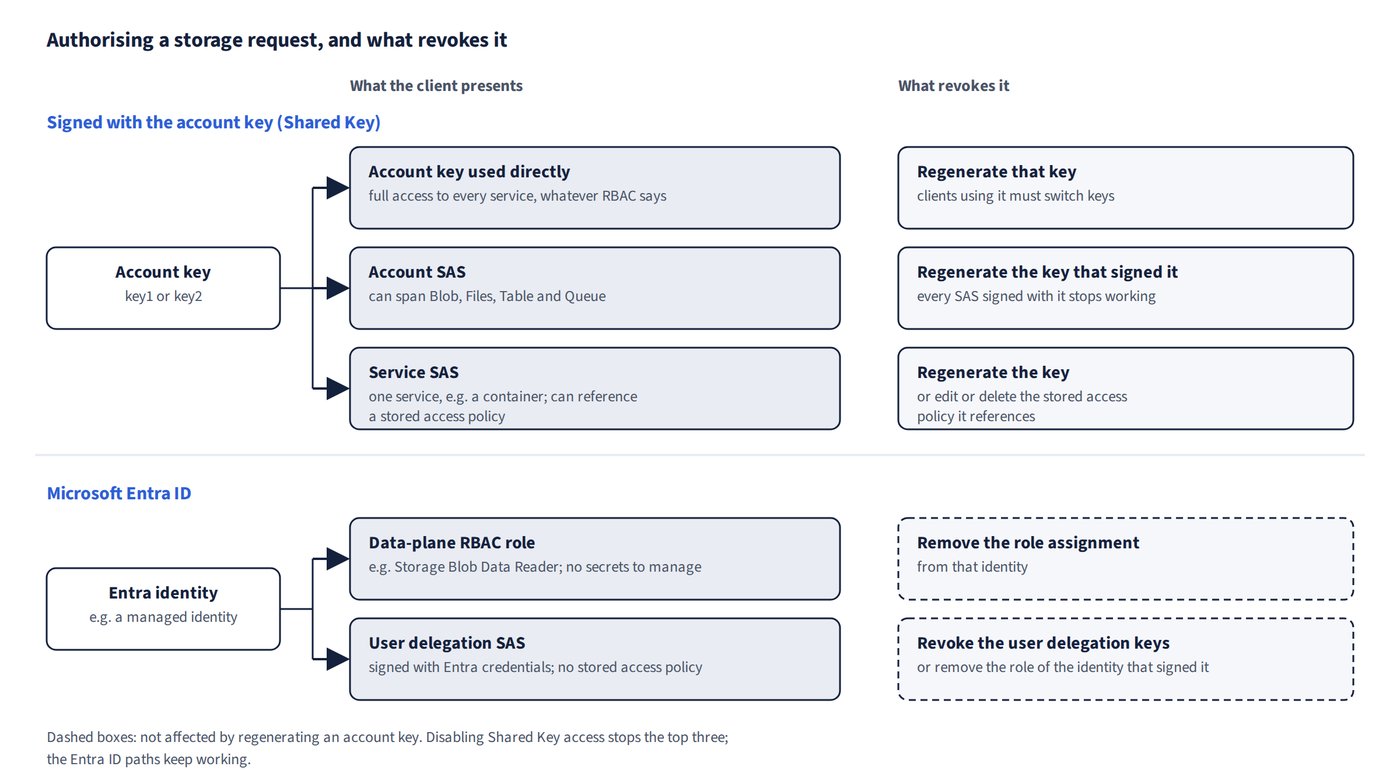
Account SAS fields for least privilege
| Field | Values and meaning |
|---|---|
| Allowed services (ss) | Blob only = b. A Table-only SAS can’t reach blobs or files, whatever its permissions |
| Allowed resource types (srt) | Service = service-level APIs (list containers); Container = list blobs in a container; Object (o) = read/download individual blobs |
| Permissions (sp) | Read (r) to download, List (l) to enumerate. Write, Delete, Add, Create, Update, Immutable storage, Permanent delete not needed; Process is for queue messages |
| Allowed protocols (spr) | HTTPS only, or HTTPS and HTTP |
| Allowed IP range (sip) | Requests from outside the range are denied, even if otherwise valid |
How a SAS behaves
- A SAS grants exactly its permissions (it is “read-only” only if it carries just
r) to any client that presents it within its start/expiry window, IP range and allowed protocols. Outside those limits, requests are denied; the client isn’t prompted for credentials. - Storage Explorer can connect by using a SAS URL.
- A SAS authorises REST (HTTPS) requests only. SMB (
net use) doesn’t accept a SAS as the password; SMB needs the account key or identity-based authentication. - A SAS can’t filter by blob index tags; use Azure ABAC role assignment conditions for that.
Limiting SAS lifetimes
A SAS expiration policy (sasPolicy) sets a recommended upper limit on SAS validity. Historically the portal setting was “Allow recommended upper limit for shared access signature (SAS) expiry interval” (for example, 7 days), which only warned when a SAS exceeded it; today you enable Shared access signature (SAS) expiration policy under Configuration, set the Upper limit for SAS expiry interval, and choose the expiration action: Log (the default, which warns and logs) or Block (which denies requests made with an out-of-policy SAS). Lifecycle management, Azure Monitor alerts and read-only locks don’t do this job.