Once an NSG is associated, Azure evaluates its rules in a strict order. Most NSG troubleshooting comes down to working out which rule matches first.
Priority and first match
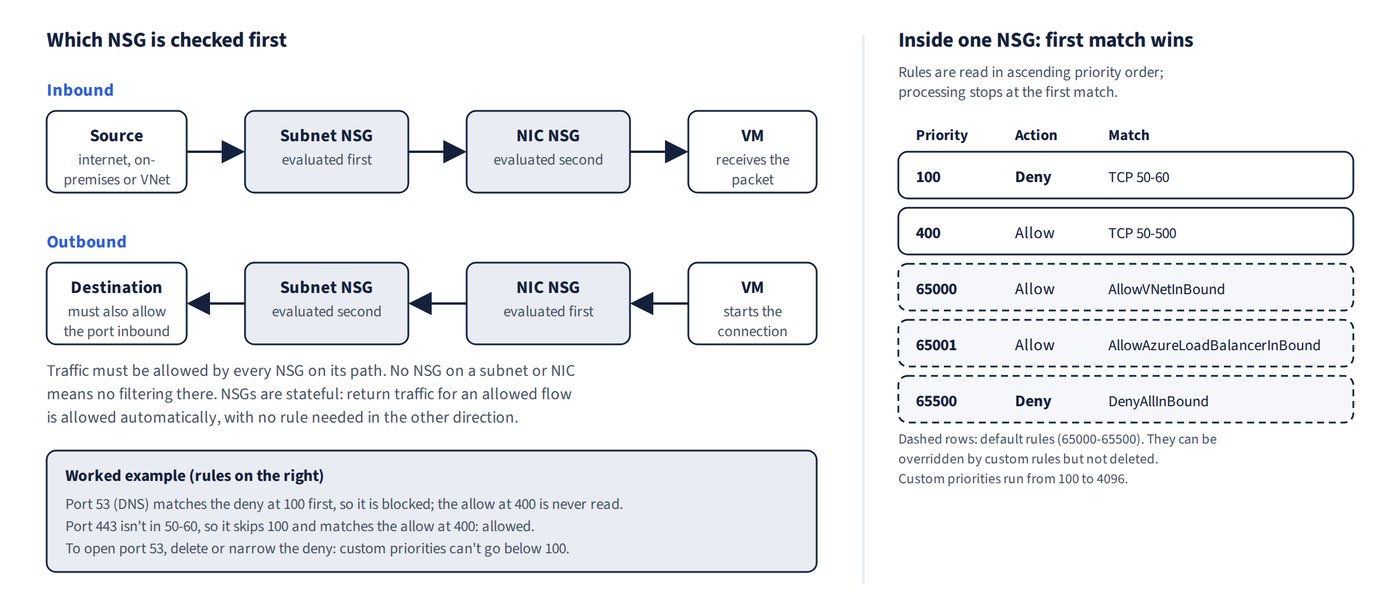
Rules are processed in ascending priority order (lower number first); the first matching rule applies and processing stops. Custom priorities range from 100 to 4096, and the default rules sit at 65000-65500 (so 64999 isn’t a valid custom priority).
To allow traffic that is currently blocked, add an Allow rule with a lower priority number than the Deny rule. A Deny rule never makes traffic succeed. If an allow rule is already at 100, it can’t gain precedence, so the block must be somewhere else (another NSG or the rule’s criteria).
Worked examples:
- A deny for ports 50-60 at priority 100 plus an allow for 50-500 at 400 blocks DNS (port 53) but allows 80 and 443. Deleting the deny allows both.
- An allow at 101 beats a deny at 125.
Subnet and NIC NSGs together
Inbound traffic must be allowed by both the subnet NSG (evaluated first) and the NIC NSG.
NSGs are stateful: return traffic for an allowed flow is allowed automatically, so you don’t need a matching rule in the other direction.
For outbound traffic the order is reversed: the NIC NSG is evaluated first, then the subnet NSG. (See Figure 12.1.)
Default rules
| Default rule | Priority | Effect |
|---|---|---|
| AllowVNetInBound | 65000 | Traffic within the VNet and peered VNets |
| AllowAzureLoadBalancerInBound | 65001 | Health probe traffic |
| DenyAllInBound | 65500 | Everything else, including internet |
| AllowVnetOutBound | 65000 | VM-initiated traffic to VNet/peered VNets |
| AllowInternetOutBound | 65001 | Outbound internet |
| DenyAllOutBound | 65500 | Everything else outbound |
You can’t delete the default rules, but custom rules with a higher priority (a lower number) override them.
Reading rules correctly
- The VirtualNetwork service tag includes the address spaces of peered VNets. A deny with source Internet doesn’t block intra-VNet traffic, and an outbound deny for TCP 3389 to VirtualNetwork blocks RDP to peers but not ICMP (ping).
- A NIC NSG allowing TCP 3389 from Any permits internet RDP to a VM with a public IP if no subnet NSG blocks it.
- AllowVnetOutBound lets a VM start connections, but the destination’s NSG must still allow the port.
- RDP uses destination port TCP 3389; the client’s source port is ephemeral. To stop one VM opening RDP sessions to another, deny outbound destination port 3389 on the source VM’s NIC; rules on the source port don’t block RDP.
- Web clients need an inbound allow for TCP 443; an outbound rule doesn’t let internet clients start connections.
- To stop users browsing the web, use an outbound deny (for example TCP 80 at priority 1000, which beats AllowInternetOutBound).
- Behind Azure Load Balancer the VM sees the client’s source IP, so allow that source (or Internet) on 443 above the deny. The AzureLoadBalancer tag covers health probes only.