Microsoft Entra ID recognises three ways a device can hold an identity, and each answers a different ownership and sign-in question. The table compares them as documented on Microsoft Learn.
| Microsoft Entra registered | Microsoft Entra joined | Microsoft Entra hybrid joined | |
|---|---|---|---|
| Also called | Workplace joined | Cloud-native endpoint | Hybrid join |
| Definition | Registered without requiring an organisational account to sign in to the device | Joined only to Microsoft Entra ID; organisational account required to sign in | Joined to on-premises Active Directory and registered with Microsoft Entra ID |
| Ownership | User or organisation | Organisation | Organisation |
| Operating systems | Windows 10 or newer, macOS 10.15 or newer, iOS 15 or newer, Android, Ubuntu 22.04/24.04 LTS, RHEL 8/9 | Windows 10 and 11 except Home editions, Windows Server 2019 and newer VMs in Azure, Windows Enterprise multi-session VMs in Azure, macOS 13 or newer, Ubuntu 22.04/24.04/26.04 LTS, RHEL 9/10 | Windows 10 and 11 except Home editions, Windows Server 2016, 2019 and 2022 |
| Sign-in to the device | Local credentials (for example a Microsoft account), password, Windows Hello, PIN, biometrics | Organisational account (password, smart card, Windows Hello for Business, FIDO2 and more) | Organisational account (password, Windows Hello for Business, FIDO2) |
| Provisioning | Windows Settings; Company Portal or Microsoft Authenticator (iOS, Android); Company Portal (macOS); Intune agent (Linux) | OOBE, Settings, bulk enrolment, Windows Autopilot | Domain join by IT or Autopilot, then automatic join through Microsoft Entra Connect or AD FS |
| Management | MDM (Intune) or MAM | MDM, or Configuration Manager standalone or co-management | Group Policy, Configuration Manager standalone or co-management with Intune |
| Key capabilities | SSO to cloud resources; Conditional Access when enrolled in Intune or via app protection | SSO to cloud and on-premises resources; Conditional Access; SSPR and Windows Hello PIN reset at the lock screen | SSO to cloud and on-premises resources; Conditional Access through domain join or Intune if co-managed |
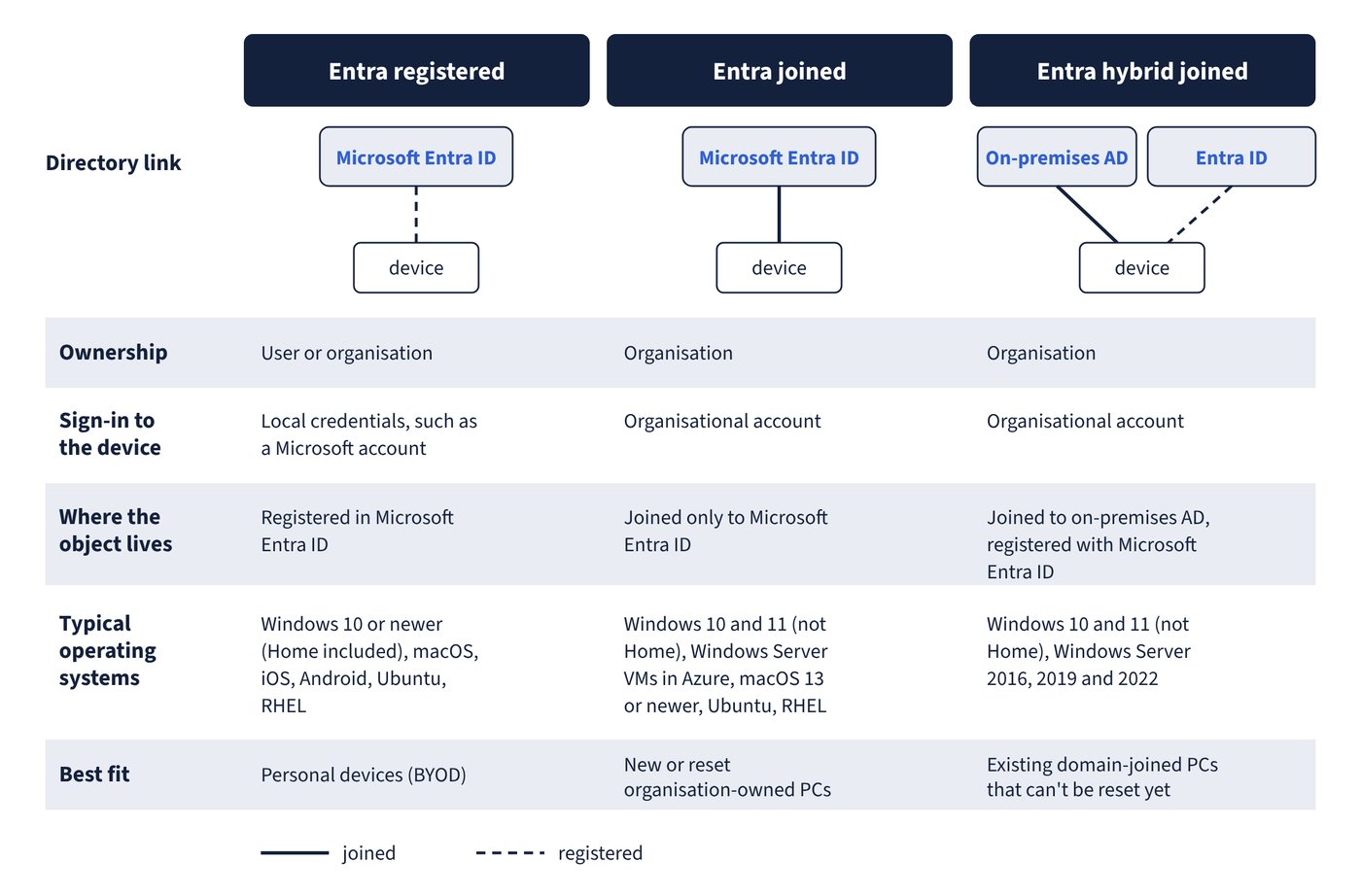
Microsoft Entra registration is the bring-your-own-device model: the device gets an identity so that its user can reach work resources, but the person still signs in to the device with their own account. Microsoft Entra join is the organisation-owned, cloud-first model, and Microsoft Entra hybrid join keeps a device in on-premises Active Directory while giving it a cloud identity. Hybrid joined devices need line of sight to a domain controller periodically; without it they become unusable for sign-in and policy. Figure 1.1 sets the three states side by side.
Common trap: Assuming Windows 11 Home can be Microsoft Entra joined like Pro - Microsoft Entra join and hybrid join cover all Windows 10 and 11 editions except Home; a Home device can only be Microsoft Entra registered.
Common trap: Planning Microsoft Entra join or registration for Windows 8.1 PCs - Microsoft Entra join supports only Windows 10 and Windows 11, Intune ended Windows 8.1 support on 22 October 2022, and Windows 10 itself reached end of support on 14 October 2025, so it is now only an “allowed” version in Intune.