An app protection policy is a set of rules that applies when a user works with organisational (“corporate”) data inside an app that integrates the Intune App SDK or has been wrapped with the Intune App Wrapping Tool. Policies target the user’s identity, so the same policy can follow a user to enrolled and unenrolled devices.
| Scenario | Device enrolled? | What app protection adds |
|---|---|---|
| Corporate device enrolled in Intune | Yes | Data loss prevention inside apps on top of MDM controls such as Wi-Fi, VPN, certificates and app deployment |
| Device enrolled in a non-Microsoft MDM | Yes (other vendor) | App-level protection; MAM shouldn’t be combined with non-Microsoft MAM or container products |
| Personal device (BYOD) | No | App-level protection only: apps come from the public store, and no certificates, Wi-Fi or VPN profiles are delivered |
What every user needs:
- A Microsoft Entra account and an Intune licence.
- Membership of a group targeted by an app protection policy that also targets the app being used.
- Sign-in to the app with the work or school account.
- On Android, the Intune Company Portal app installed, even on unenrolled devices; Microsoft 365 apps on Android also require the device to be registered in Microsoft Entra ID.
- For Office mobile apps, a managed save location such as OneDrive for work or school, and for Outlook an Exchange Online mailbox (or Exchange Server with hybrid modern authentication).
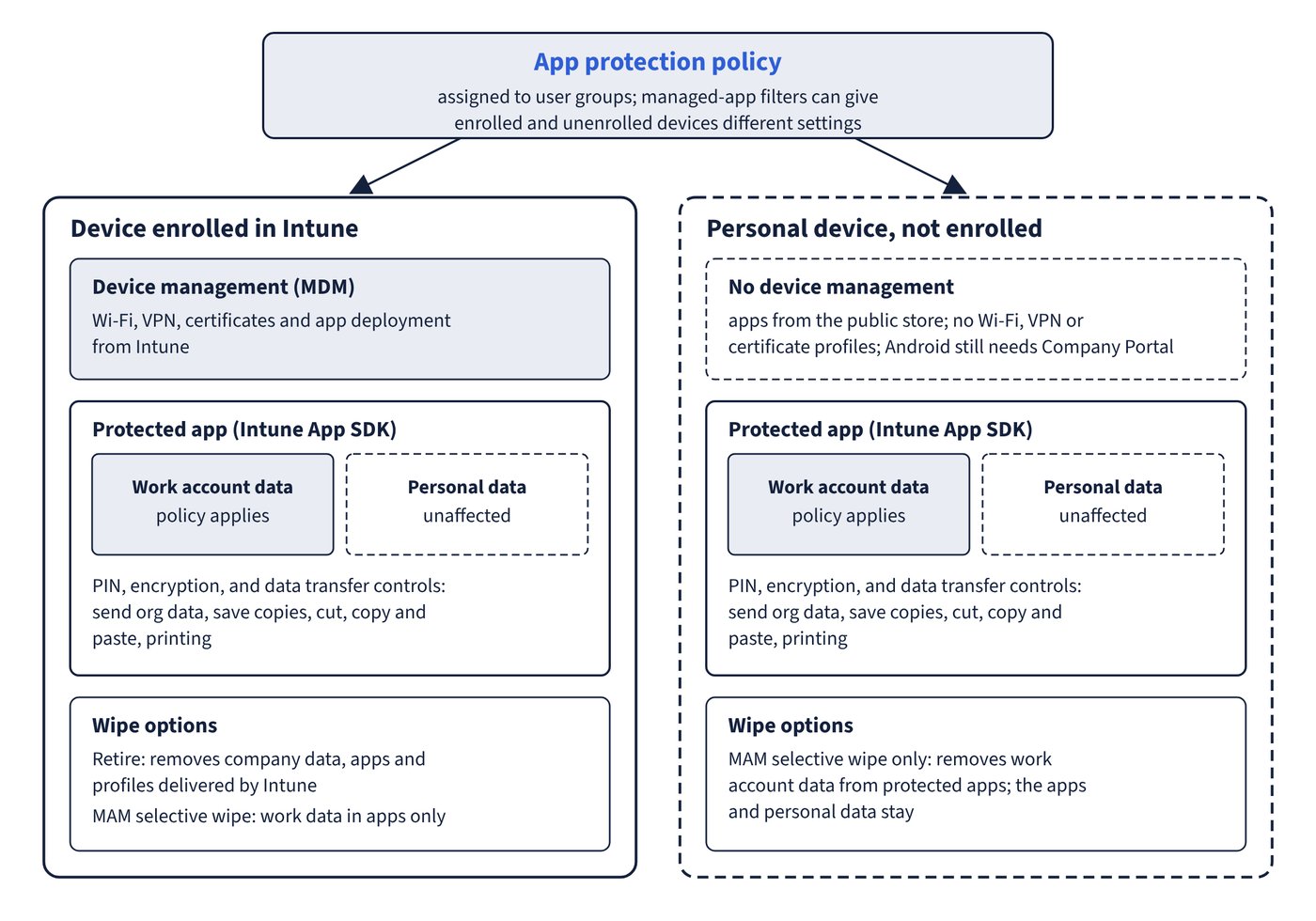
Policies apply only in the work context. A new document is personal until it is saved to a corporate location; in multi-identity apps such as Outlook, Word and Teams, personal accounts are unaffected. Figure 14.1 compares what app protection covers on enrolled and unenrolled devices.
Data protection framework
Microsoft groups recommended settings into three levels, each building on the previous one:
| Level | Name | Adds |
|---|---|---|
| 1 | Enterprise basic data protection | PIN, encryption, selective wipe, Android device attestation |
| 2 | Enterprise enhanced data protection | Data leakage controls and minimum OS versions; recommended for most users |
| 3 | Enterprise high data protection | Advanced data protection, stronger PIN, Mobile Threat Defense |
Common trap: Using Windows Information Protection (WIP) to stop data being copied from work apps to personal apps on Windows - WIP was deprecated in July 2022 and removed from Windows 11 version 24H2; Intune app protection (MAM) covers Windows through Microsoft Edge, and Microsoft Purview handles wider data loss prevention.
Common trap: Assuming unenrolled Android users only need Outlook or Teams from the Play Store - the Company Portal app is required on Android to receive any app protection policy, even though the device isn’t enrolled.