Intune supports six ways to manage Android devices, and the right one follows from two questions: who owns the device, and is it used by one person, by many, or for one task. The table summarises the options as Microsoft Learn describes them in the Android enrolment guide. Figure 3.1 shows how ownership and use lead to the four Android Enterprise options.
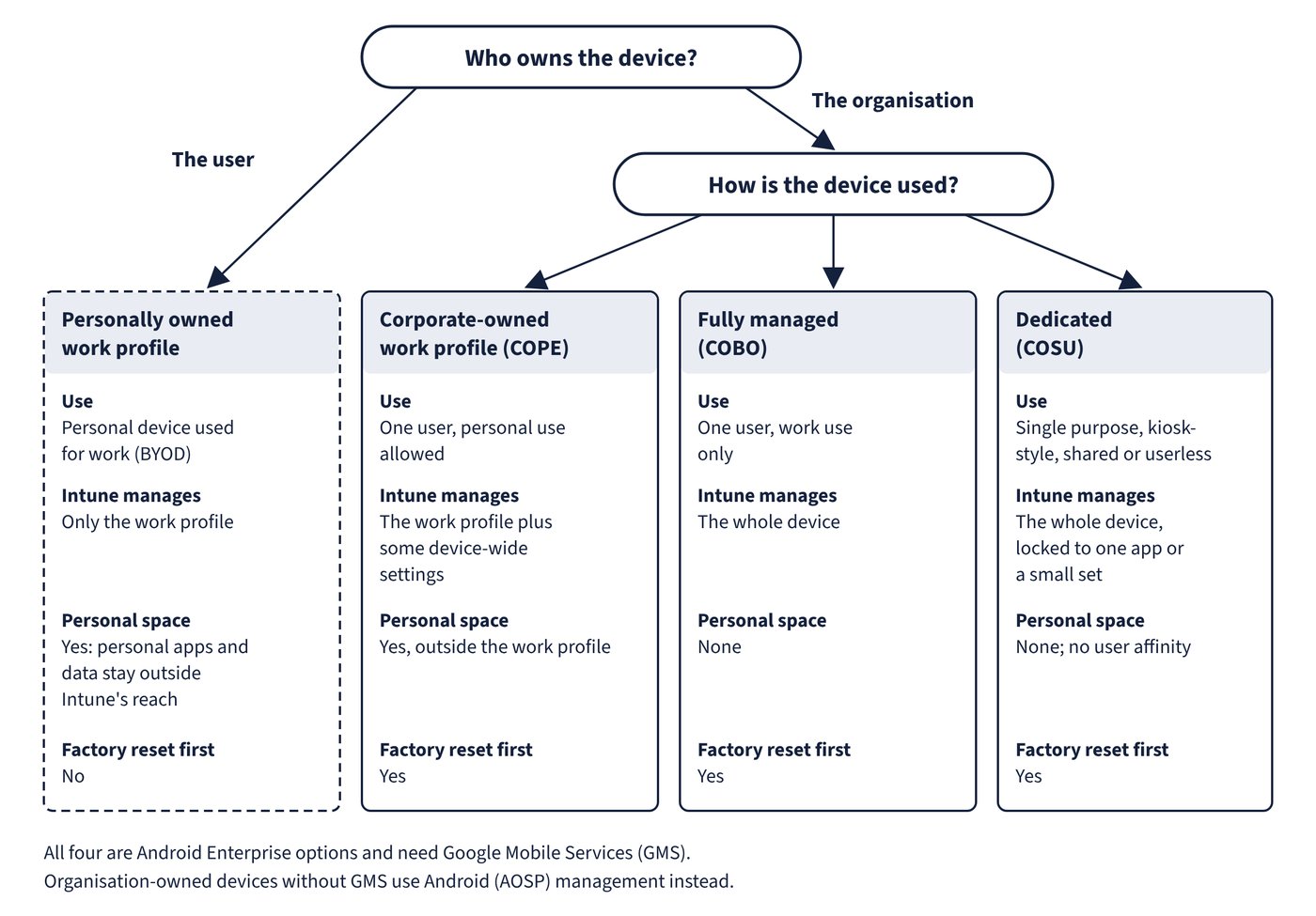
Android Enterprise is Google’s management framework, and four of the options belong to it. Android (AOSP) management covers corporate devices without GMS, and Android device administrator is the legacy option that remains only for a small set of non-GMS devices.
| Option (former nickname) | Ownership and use | Needs GMS | User affinity | Factory reset before enrolment | DEM account |
|---|---|---|---|---|---|
| Personally owned work profile (BYOD) | Personal device; work apps and data in a separate work profile | Yes | Single user | No | Supported |
| Corporate-owned work profile (COPE) | Company device, one user, personal use allowed | Yes | Single user | Yes | Not supported |
| Fully managed (COBO) | Company device, one user, work use only | Yes | Single user | Yes | Not supported |
| Dedicated (COSU) | Company device, kiosk-style, single purpose, shared or userless | Yes | None | Yes | Not supported |
| AOSP userless or user-associated | Company device without GMS (headsets and similar) | No | None or single user | Yes (new devices might not need it) | Not supported |
| Device administrator (DA) | Legacy; deprecated on GMS devices | Not applicable | Single user | No | Not applicable to new designs |
Points that separate the options:
- Personally owned work profile: Intune manages only the work profile. Personal apps and data stay outside Intune’s reach, which is why the Wipe action is not offered for these devices; Retire removes the whole work profile and its contents.
- Corporate-owned work profile: the administrator controls some device-wide settings, such as the device password, Bluetooth, data roaming and factory reset protection, as well as everything in the work profile. Private space, a feature introduced in Android 15, is treated as a personal profile and isn’t managed or supported by Intune.
- Fully managed: the whole device is managed, so controls that the work profile options lack become available, such as allowing installs only from managed Google Play, blocking uninstalls of managed apps and preventing factory reset. Fully managed devices need Android 10.0 or later and GMS connectivity, with no restriction on manufacturer if those conditions are met.
- Dedicated: devices for one purpose such as digital signage, ticket printing or inventory, locked to one app or a small set of apps. They enrol without a user account; an optional token type sets them up in Microsoft Entra shared device mode so users sign in and out across apps that support it.
- AOSP: for organisation-owned devices that don’t use GMS, either userless (shared, in Microsoft Entra shared device mode) or user-associated. Only one device can be enrolled at a time, and OEM support is limited to a published list of supported devices.
Supported versions are set per management method. Microsoft Learn’s supported platforms page lists Android 10.0 and later for the user-based methods (personally owned work profile, corporate-owned work profile, fully managed, AOSP user-based) and Android 8.0 and later for the userless methods (dedicated and AOSP userless). Intune app protection policies and managed-apps app configuration also need Android 10.0 or later.
Common trap: Treating Android device administrator as a normal choice to allow or block alongside Android Enterprise - device administrator management is deprecated and no longer available for devices with access to Google Mobile Services; Intune ended support for it on GMS devices, and Microsoft recommends blocking it with an enrolment restriction and moving devices to an Android Enterprise option.
Common trap: Enrolling shared kiosk or userless corporate devices as fully managed - fully managed is for one user and work-only use; userless, single-purpose devices belong in the dedicated option (or AOSP userless when the device has no GMS).